
Build a React CRUD App with SmallStack's API
This tutorial walks you through building a React frontend that talks to SmallStack's built-in CRUDView REST API. By the end, you'll have a working inventory management app with full create, read, update, and delete operations — no Django REST Framework required.
What you'll build:
- A Django backend with two related models (Category, Product)
- CRUDViews with
enable_api = Truethat auto-generate REST endpoints - A React + Vite frontend with list pages, forms, search, and filtering
Prerequisites:
- Python 3.11+ with uv installed
- Node.js 18+
- Git
Ports used:
| Service | Port |
|---|---|
| Django backend | 8020 |
| React frontend | 8021 |
Step 1: Clone and Set Up the Backend
mkdir test_crud_api
cd test_crud_api
git clone https://github.com/emichaud/django-smallstack.git backend
cd backend
Create your environment file:
cp .env.example .env
Edit .env and add the CORS setting at the bottom — this allows the React dev server to call the API:
CORS_ALLOWED_ORIGINS=http://localhost:8021
Run the setup command. This installs dependencies, runs migrations, and creates a dev superuser (admin/admin):
make setup
Start the backend on port 8020:
make run PORT=8020
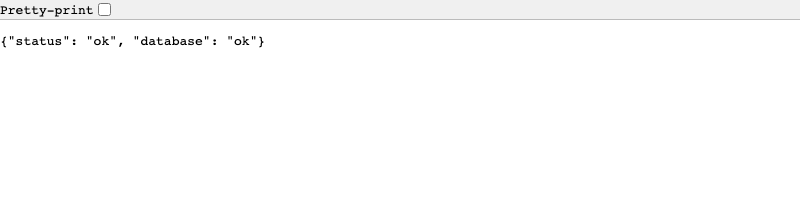
Verify it works. Open http://localhost:8020/health/ — you should see:
{"status": "ok", "database": "ok"}
Step 2: Create Your Models
Create a new Django app for the inventory data:
mkdir -p apps/inventory
uv run python manage.py startapp inventory apps/inventory
Fix the app config
Edit apps/inventory/apps.py — you must set name to "apps.inventory":
from django.apps import AppConfig


class InventoryConfig(AppConfig):
    default_auto_field = "django.db.models.BigAutoField"
    name = "apps.inventory"
    verbose_name = "Inventory"
Add models
Replace apps/inventory/models.py with two related models:
from django.db import models


class Category(models.Model):
    name = models.CharField(max_length=100)
    description = models.TextField(blank=True)
    created_at = models.DateTimeField(auto_now_add=True)

    class Meta:
        verbose_name_plural = "categories"
        ordering = ["name"]

    def __str__(self):
        return self.name


class Product(models.Model):
    name = models.CharField(max_length=200)
    category = models.ForeignKey(
        Category, on_delete=models.CASCADE, related_name="products"
    )
    price = models.DecimalField(max_digits=10, decimal_places=2)
    in_stock = models.BooleanField(default=True)
    description = models.TextField(blank=True)
    created_at = models.DateTimeField(auto_now_add=True)
    updated_at = models.DateTimeField(auto_now=True)

    class Meta:
        ordering = ["-created_at"]

    def __str__(self):
        return self.name
Register the app
Add "apps.inventory" to INSTALLED_APPS in config/settings/base.py:
INSTALLED_APPS = [
    # ...existing apps...
    "apps.website",
    "apps.inventory",  # Add this line
    # Django built-in apps
    "django.contrib.admin",
    # ...
]
Run migrations
uv run python manage.py makemigrations inventory
uv run python manage.py migrate
Step 3: Create CRUDViews with API Enabled
This is the key step. By setting enable_api = True on a CRUDView, SmallStack auto-generates REST API endpoints alongside the HTML views.
Create the views
Replace apps/inventory/views.py:
from apps.smallstack.crud import Action, CRUDView
from apps.smallstack.displays import TableDisplay
from apps.smallstack.mixins import StaffRequiredMixin
from .models import Category, Product


class CategoryCRUDView(CRUDView):
    model = Category
    fields = ["name", "description"]
    url_base = "inventory/categories"
    paginate_by = 25
    mixins = [StaffRequiredMixin]
    displays = [TableDisplay]
    actions = [Action.LIST, Action.CREATE, Action.DETAIL, Action.UPDATE, Action.DELETE]
    enable_api = True
    search_fields = ["name"]
    api_extra_fields = ["created_at"]


class ProductCRUDView(CRUDView):
    model = Product
    fields = ["name", "category", "price", "in_stock", "description"]
    url_base = "inventory/products"
    paginate_by = 25
    mixins = [StaffRequiredMixin]
    displays = [TableDisplay]
    actions = [Action.LIST, Action.CREATE, Action.DETAIL, Action.UPDATE, Action.DELETE]
    enable_api = True
    search_fields = ["name", "description"]
    filter_fields = ["category", "in_stock", "created_at"]
    api_extra_fields = ["created_at", "updated_at"]
    api_expand_fields = ["category"]
    api_aggregate_fields = ["price"]
What enable_api = True generates:
| HTTP Method | URL | Purpose |
|---|---|---|
| GET | /api/inventory/categories/ |
List all categories (paginated) |
| POST | /api/inventory/categories/ |
Create a category |
| GET | /api/inventory/categories/<id>/ |
Get one category |
| PUT/PATCH | /api/inventory/categories/<id>/ |
Update a category |
| DELETE | /api/inventory/categories/<id>/ |
Delete a category |
Same for products. Search is available via ?q=term and filtering via ?category=1&in_stock=true.
New in v0.8.10:
api_expand_fields— FK fields listed here are automatically expanded in API responses. Instead of"category": 1, the API returns"category": {"id": 1, "name": "Electronics"}.api_aggregate_fields— Enables server-side aggregation. Clients can request?sum=price,?avg=price,?min=price,?max=price.filter_fieldswith dates — Date/DateTime fields infilter_fieldsautomatically get range lookups:?created_at__gte=2026-03-01&created_at__lte=2026-03-31.api_extra_fields— Read-only fields (like timestamps) included in API responses without appearing in forms.
Wire the URLs
Create apps/inventory/urls.py:
from .views import CategoryCRUDView, ProductCRUDView

app_name = "inventory"

urlpatterns = [
    *CategoryCRUDView.get_urls(),
    *ProductCRUDView.get_urls(),
]
Add to config/urls.py (before the website include):
urlpatterns = [
    # Inventory CRUD + API
    path("", include("apps.inventory.urls")),
    # Project pages
    path("", include("apps.website.urls")),
    # ...rest of URLs...
]
Step 4: Create an API Token
SmallStack uses Bearer token authentication. Generate a token for the admin user:
uv run python manage.py create_api_token admin
Output:
Token created for admin:

  cUOMvR6LuiIxRYbucaPwmdjlbOdoYqIeVkMlFrs4m4M

Save this key — it cannot be retrieved later.
Copy this token. You'll need it for the React app.
Verify the API works
Test with curl:
# List categories (should return empty results)
curl -H "Authorization: Bearer YOUR_TOKEN" http://localhost:8020/api/inventory/categories/

# Create a category
curl -X POST \
  -H "Authorization: Bearer YOUR_TOKEN" \
  -H "Content-Type: application/json" \
  -d '{"name": "Electronics", "description": "Electronic products"}' \
  http://localhost:8020/api/inventory/categories/

# List again (should show the category)
curl -H "Authorization: Bearer YOUR_TOKEN" http://localhost:8020/api/inventory/categories/
Expected responses:
// POST /api/inventory/categories/ → 201 Created
{"id": 1, "name": "Electronics", "description": "Electronic products"}

// GET /api/inventory/categories/ → 200 OK
{"count": 1, "next": null, "previous": null, "results": [
  {"id": 1, "name": "Electronics", "description": "Electronic products"}
]}
Step 5: Create the React Frontend
Open a new terminal. From the test_crud_api directory:
npm create vite@latest frontend -- --template react
cd frontend
npm install
npm install react-router-dom
Configure the port
Edit vite.config.js:
import { defineConfig } from 'vite'
import react from '@vitejs/plugin-react'

export default defineConfig({
  plugins: [react()],
  server: { port: 8021 },
})
Store the API token
Create frontend/.env:
VITE_API_BASE_URL=http://localhost:8020/api
VITE_API_TOKEN=YOUR_TOKEN_HERE
Note: In production, you'd use a login flow instead of a hardcoded token. For development, env vars are fine.
Step 6: Build the API Client
Create src/api/client.js — a thin wrapper around fetch that handles auth, JSON parsing, and errors:
const BASE_URL = import.meta.env.VITE_API_BASE_URL || 'http://localhost:8020/api';
const TOKEN = import.meta.env.VITE_API_TOKEN || '';

class ApiError extends Error {
  constructor(status, data) {
    super(`API Error ${status}`);
    this.status = status;
    this.data = data;
  }
}

async function request(path, options = {}) {
  const url = `${BASE_URL}${path}`;
  const headers = {
    'Authorization': `Bearer ${TOKEN}`,
    ...options.headers,
  };

  if (options.body && typeof options.body === 'object') {
    headers['Content-Type'] = 'application/json';
    options.body = JSON.stringify(options.body);
  }

  const response = await fetch(url, { ...options, headers });

  if (response.status === 204) return null; // DELETE returns no content

  const data = await response.json().catch(() => null);

  if (!response.ok) {
    throw new ApiError(response.status, data);
  }

  return data;
}

export const api = {
  // Categories
  listCategories: (params = '') =>
    request(`/inventory/categories/${params ? '?' + params : ''}`),
  getCategory: (id) =>
    request(`/inventory/categories/${id}/`),
  createCategory: (data) =>
    request('/inventory/categories/', { method: 'POST', body: data }),
  updateCategory: (id, data) =>
    request(`/inventory/categories/${id}/`, { method: 'PATCH', body: data }),
  deleteCategory: (id) =>
    request(`/inventory/categories/${id}/`, { method: 'DELETE' }),

  // Products
  listProducts: (params = '') =>
    request(`/inventory/products/${params ? '?' + params : ''}`),
  getProduct: (id) =>
    request(`/inventory/products/${id}/`),
  createProduct: (data) =>
    request('/inventory/products/', { method: 'POST', body: data }),
  updateProduct: (id, data) =>
    request(`/inventory/products/${id}/`, { method: 'PATCH', body: data }),
  deleteProduct: (id) =>
    request(`/inventory/products/${id}/`, { method: 'DELETE' }),
};

export { ApiError };
Key design decisions:
- Bearer token is sent on every request via the
Authorizationheader - PATCH (not PUT) for updates — sends only changed fields
- ApiError captures the status code and response body, so you can display validation errors in forms
- 204 handling — DELETE returns no body, so we return
null
Step 7: Build Reusable Components
Error Display
Create src/components/ErrorDisplay.jsx:
export default function ErrorDisplay({ error }) {
  if (!error) return null;

  // API validation errors (400) — per-field messages
  if (error.data?.errors) {
    return (
      <div className="error-box">
        <strong>Validation Errors:</strong>
        <ul>
          {Object.entries(error.data.errors).map(([field, messages]) => (
            <li key={field}>
              <strong>{field}:</strong>{' '}
              {Array.isArray(messages) ? messages.join(', ') : messages}
            </li>
          ))}
        </ul>
      </div>
    );
  }

  // General API errors (401, 403, 404, 405)
  if (error.data?.error) {
    return <div className="error-box">{error.data.error}</div>;
  }

  return <div className="error-box">{error.message || 'An error occurred'}</div>;
}
SmallStack returns validation errors as {"errors": {"field": ["message"]}}, which maps cleanly to per-field display.
Pagination
Create src/components/Pagination.jsx:
export default function Pagination({ count, next, previous, page, onPageChange }) {
  if (!next && !previous) return null;

  return (
    <div className="pagination">
      <button disabled={!previous} onClick={() => onPageChange(page - 1)}>
        Previous
      </button>
      <span>Page {page} ({count} total items)</span>
      <button disabled={!next} onClick={() => onPageChange(page + 1)}>
        Next
      </button>
    </div>
  );
}
The API returns count, next, and previous in every list response — pass them straight through.
Step 8: Build the Pages
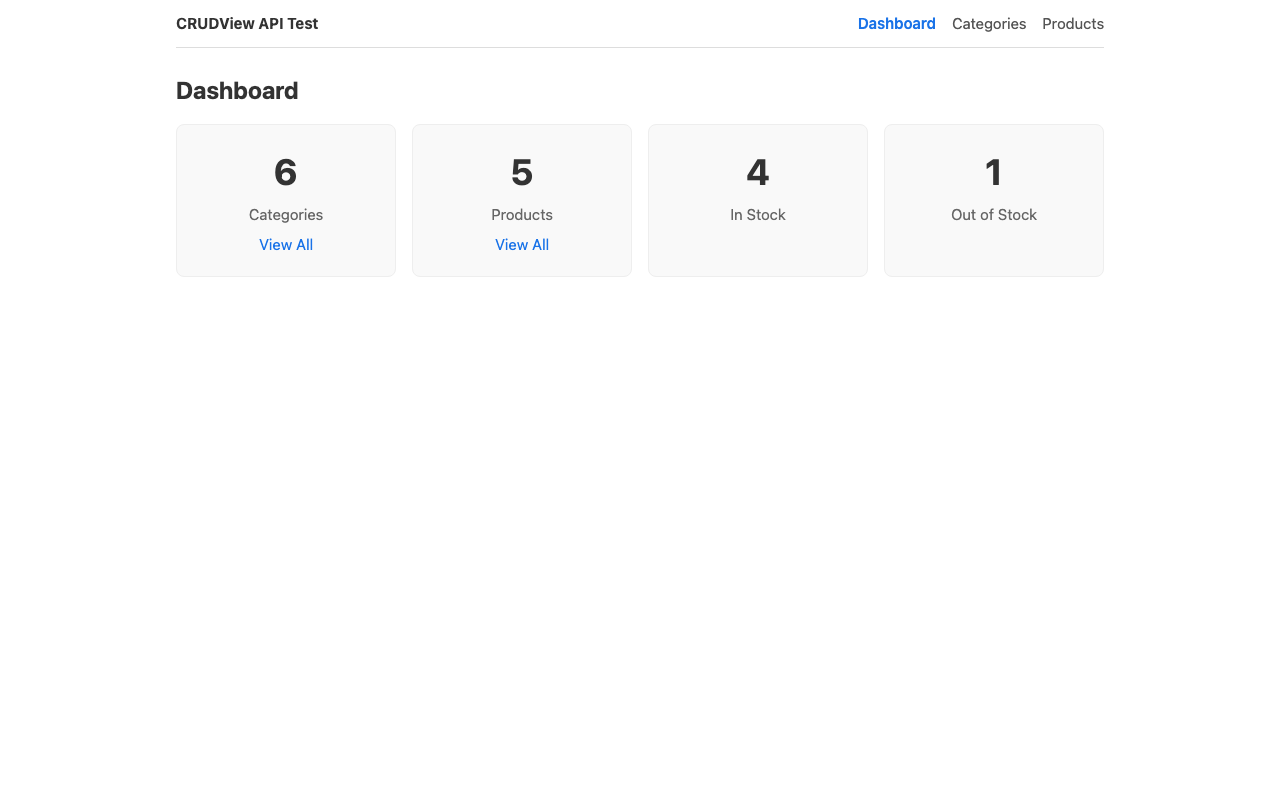
Dashboard
Create src/pages/Dashboard.jsx:
import { useState, useEffect } from 'react';
import { Link } from 'react-router-dom';
import { api } from '../api/client';
import ErrorDisplay from '../components/ErrorDisplay';

export default function Dashboard() {
  const [stats, setStats] = useState(null);
  const [error, setError] = useState(null);

  useEffect(() => {
    async function loadStats() {
      try {
        const [cats, prods] = await Promise.all([
          api.listCategories(),
          api.listProducts('count_by=in_stock'),
        ]);
        const counts = prods.counts || {};
        setStats({
          categories: cats.count,
          products: prods.count,
          inStock: counts['true'] || counts['True'] || 0,
          outOfStock: counts['false'] || counts['False'] || 0,
        });
      } catch (err) {
        setError(err);
      }
    }
    loadStats();
  }, []);

  return (
    <div>
      <h1>Dashboard</h1>
      <ErrorDisplay error={error} />
      {stats ? (
        <div className="stats-grid">
          <div className="stat-card">
            <h2>{stats.categories}</h2>
            <p>Categories</p>
            <Link to="/categories">View All</Link>
          </div>
          <div className="stat-card">
            <h2>{stats.products}</h2>
            <p>Products</p>
            <Link to="/products">View All</Link>
          </div>
          <div className="stat-card">
            <h2>{stats.inStock}</h2>
            <p>In Stock</p>
          </div>
          <div className="stat-card">
            <h2>{stats.outOfStock}</h2>
            <p>Out of Stock</p>
          </div>
        </div>
      ) : !error ? (
        <p>Loading...</p>
      ) : null}
    </div>
  );
}
Categories List
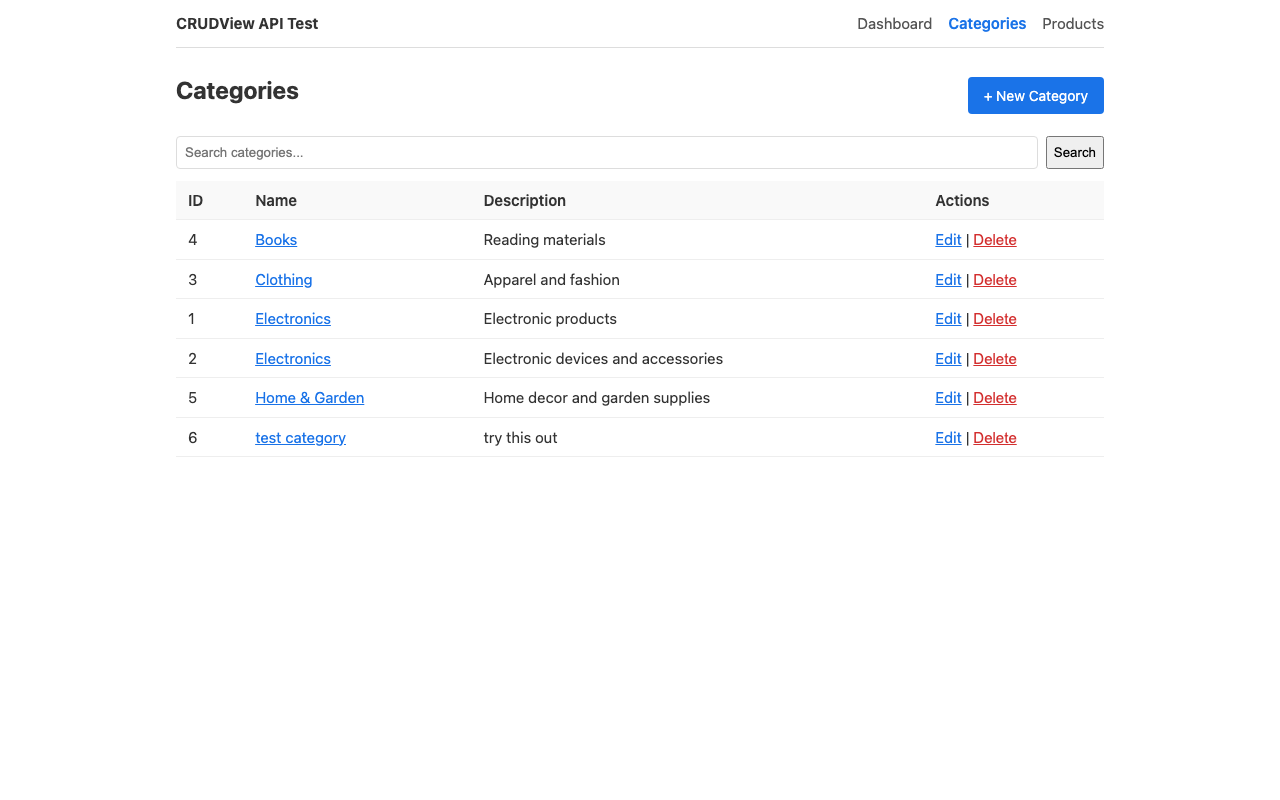
Create src/pages/CategoriesList.jsx:
import { useState, useEffect } from 'react';
import { Link, useSearchParams } from 'react-router-dom';
import { api } from '../api/client';
import ErrorDisplay from '../components/ErrorDisplay';
import Pagination from '../components/Pagination';

export default function CategoriesList() {
  const [searchParams, setSearchParams] = useSearchParams();
  const [data, setData] = useState(null);
  const [error, setError] = useState(null);
  const [search, setSearch] = useState(searchParams.get('q') || '');

  const page = parseInt(searchParams.get('page') || '1', 10);

  async function load() {
    try {
      setError(null);
      const params = new URLSearchParams();
      if (page > 1) params.set('page', page);
      if (search) params.set('q', search);
      const result = await api.listCategories(params.toString());
      setData(result);
    } catch (err) {
      setError(err);
    }
  }

  useEffect(() => { load(); }, [page, searchParams.get('q')]);

  async function handleDelete(id) {
    if (!confirm('Delete this category?')) return;
    try {
      await api.deleteCategory(id);
      load(); // Refresh the list
    } catch (err) {
      setError(err);
    }
  }

  function handleSearch(e) {
    e.preventDefault();
    setSearchParams(search ? { q: search } : {});
  }

  return (
    <div>
      <div className="page-header">
        <h1>Categories</h1>
        <Link to="/categories/new" className="btn">+ New Category</Link>
      </div>

      <form onSubmit={handleSearch} className="search-form">
        <input
          type="text"
          placeholder="Search categories..."
          value={search}
          onChange={e => setSearch(e.target.value)}
        />
        <button type="submit">Search</button>
      </form>

      <ErrorDisplay error={error} />

      {data ? (
        <>
          <table>
            <thead>
              <tr>
                <th>ID</th>
                <th>Name</th>
                <th>Description</th>
                <th>Actions</th>
              </tr>
            </thead>
            <tbody>
              {data.results.length === 0 ? (
                <tr><td colSpan="4">No categories found.</td></tr>
              ) : data.results.map(cat => (
                <tr key={cat.id}>
                  <td>{cat.id}</td>
                  <td><Link to={`/categories/${cat.id}/edit`}>{cat.name}</Link></td>
                  <td>{cat.description || '—'}</td>
                  <td>
                    <Link to={`/categories/${cat.id}/edit`}>Edit</Link>
                    {' | '}
                    <button className="btn-link danger" onClick={() => handleDelete(cat.id)}>
                      Delete
                    </button>
                  </td>
                </tr>
              ))}
            </tbody>
          </table>
          <Pagination
            count={data.count}
            next={data.next}
            previous={data.previous}
            page={page}
            onPageChange={p => setSearchParams({ ...Object.fromEntries(searchParams), page: p })}
          />
        </>
      ) : !error ? (
        <p>Loading...</p>
      ) : null}
    </div>
  );
}
Category Form (Create + Edit)
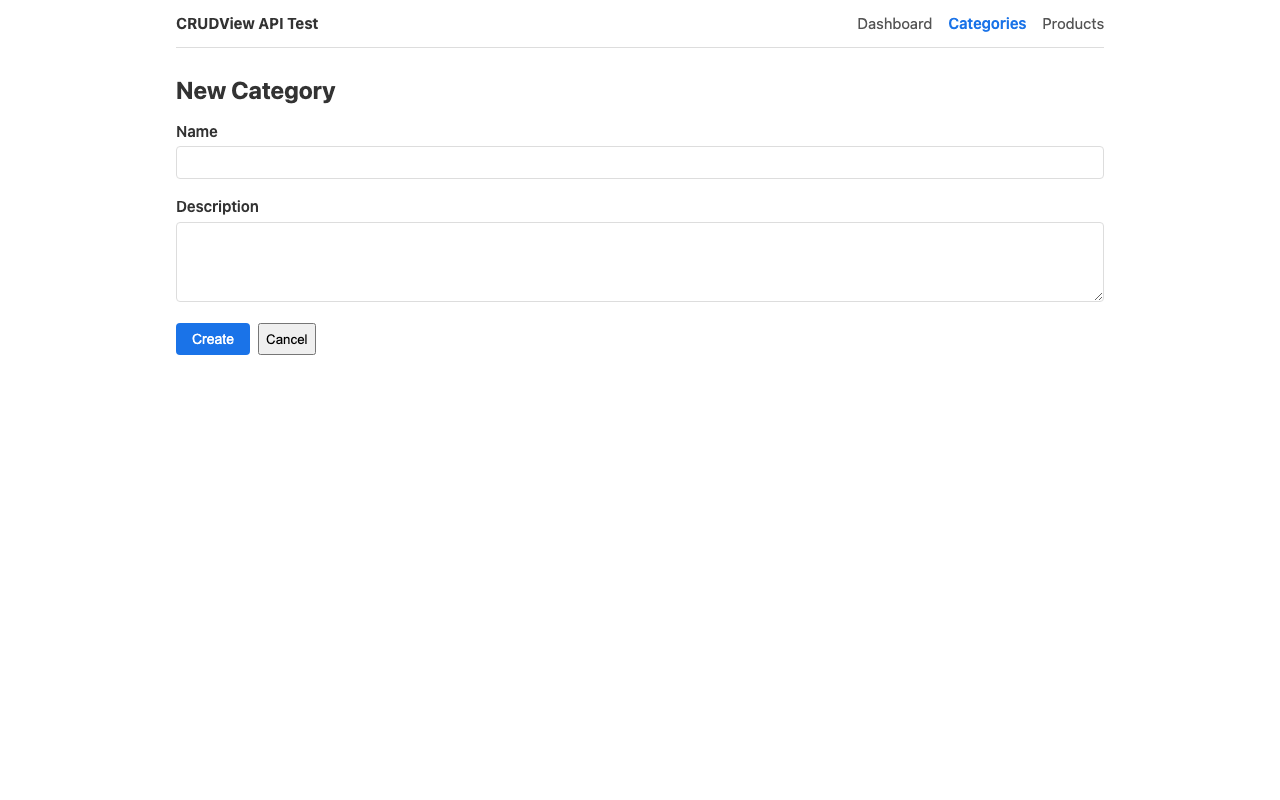
Create src/pages/CategoryForm.jsx — a single component handles both create and edit:
import { useState, useEffect } from 'react';
import { useNavigate, useParams } from 'react-router-dom';
import { api } from '../api/client';
import ErrorDisplay from '../components/ErrorDisplay';

export default function CategoryForm() {
  const { id } = useParams();
  const navigate = useNavigate();
  const isEdit = Boolean(id);

  const [form, setForm] = useState({ name: '', description: '' });
  const [error, setError] = useState(null);
  const [fieldErrors, setFieldErrors] = useState({});
  const [saving, setSaving] = useState(false);

  useEffect(() => {
    if (isEdit) {
      api.getCategory(id)
        .then(data => setForm({ name: data.name, description: data.description || '' }))
        .catch(err => setError(err));
    }
  }, [id]);

  async function handleSubmit(e) {
    e.preventDefault();
    setSaving(true);
    setError(null);
    setFieldErrors({});
    try {
      if (isEdit) {
        await api.updateCategory(id, form);
      } else {
        await api.createCategory(form);
      }
      navigate('/categories');
    } catch (err) {
      if (err.data?.errors) {
        setFieldErrors(err.data.errors);
      }
      setError(err);
      setSaving(false);
    }
  }

  return (
    <div>
      <h1>{isEdit ? 'Edit Category' : 'New Category'}</h1>
      <ErrorDisplay error={error} />

      <form onSubmit={handleSubmit}>
        <div className="form-group">
          <label>Name</label>
          <input
            type="text"
            value={form.name}
            onChange={e => setForm({ ...form, name: e.target.value })}
          />
          {fieldErrors.name && (
            <span className="field-error">{fieldErrors.name.join(', ')}</span>
          )}
        </div>

        <div className="form-group">
          <label>Description</label>
          <textarea
            value={form.description}
            onChange={e => setForm({ ...form, description: e.target.value })}
          />
        </div>

        <div className="form-actions">
          <button type="submit" className="btn" disabled={saving}>
            {saving ? 'Saving...' : isEdit ? 'Update' : 'Create'}
          </button>
          <button type="button" onClick={() => navigate('/categories')}>Cancel</button>
        </div>
      </form>
    </div>
  );
}
Products List
Create src/pages/ProductsList.jsx. This page demonstrates two important patterns:
- FK expansion —
api_expand_fields = ["category"]means products arrive withcategory: {"id": 1, "name": "Electronics"}inline — no separate fetch needed for display - Filtering —
filter_fieldson the CRUDView enables query-param filtering
import { useState, useEffect } from 'react';
import { Link, useSearchParams } from 'react-router-dom';
import { api } from '../api/client';
import ErrorDisplay from '../components/ErrorDisplay';
import Pagination from '../components/Pagination';

export default function ProductsList() {
  const [searchParams, setSearchParams] = useSearchParams();
  const [data, setData] = useState(null);
  const [categories, setCategories] = useState([]);
  const [error, setError] = useState(null);
  const [search, setSearch] = useState(searchParams.get('q') || '');

  const page = parseInt(searchParams.get('page') || '1', 10);
  const categoryFilter = searchParams.get('category') || '';
  const stockFilter = searchParams.get('in_stock') || '';

  // Fetch categories for the filter dropdown (not needed for display — expansion handles that)
  useEffect(() => {
    api.listCategories().then(result => {
      setCategories(result.results);
    }).catch(() => {});
  }, []);

  async function loadProducts() {
    try {
      setError(null);
      const params = new URLSearchParams();
      if (page > 1) params.set('page', page);
      if (search) params.set('q', search);
      if (categoryFilter) params.set('category', categoryFilter);
      if (stockFilter) params.set('in_stock', stockFilter);
      const result = await api.listProducts(params.toString());
      setData(result);
    } catch (err) {
      setError(err);
    }
  }

  useEffect(() => { loadProducts(); }, [page, searchParams.toString()]);

  async function handleDelete(id) {
    if (!confirm('Delete this product?')) return;
    try {
      await api.deleteProduct(id);
      loadProducts();
    } catch (err) {
      setError(err);
    }
  }

  function setFilter(key, value) {
    const params = Object.fromEntries(searchParams);
    if (value) {
      params[key] = value;
    } else {
      delete params[key];
    }
    delete params.page;
    setSearchParams(params);
  }

  function handleSearch(e) {
    e.preventDefault();
    const params = {};
    if (search) params.q = search;
    if (categoryFilter) params.category = categoryFilter;
    if (stockFilter) params.in_stock = stockFilter;
    setSearchParams(params);
  }

  return (
    <div>
      <div className="page-header">
        <h1>Products</h1>
        <Link to="/products/new" className="btn">+ New Product</Link>
      </div>

      <form onSubmit={handleSearch} className="search-form">
        <input
          type="text"
          placeholder="Search products..."
          value={search}
          onChange={e => setSearch(e.target.value)}
        />
        <button type="submit">Search</button>
      </form>

      <div className="filters">
        <select value={categoryFilter} onChange={e => setFilter('category', e.target.value)}>
          <option value="">All Categories</option>
          {categories.map(c => (
            <option key={c.id} value={c.id}>{c.name}</option>
          ))}
        </select>
        <select value={stockFilter} onChange={e => setFilter('in_stock', e.target.value)}>
          <option value="">All Stock Status</option>
          <option value="true">In Stock</option>
          <option value="false">Out of Stock</option>
        </select>
      </div>

      <ErrorDisplay error={error} />

      {data ? (
        <>
          <table>
            <thead>
              <tr>
                <th>ID</th>
                <th>Name</th>
                <th>Category</th>
                <th>Price</th>
                <th>In Stock</th>
                <th>Actions</th>
              </tr>
            </thead>
            <tbody>
              {data.results.length === 0 ? (
                <tr><td colSpan="6">No products found.</td></tr>
              ) : data.results.map(prod => (
                <tr key={prod.id}>
                  <td>{prod.id}</td>
                  <td><Link to={`/products/${prod.id}/edit`}>{prod.name}</Link></td>
                  <td>{prod.category?.name || `Category #${prod.category}`}</td>
                  <td>${prod.price}</td>
                  <td>{prod.in_stock ? 'Yes' : 'No'}</td>
                  <td>
                    <Link to={`/products/${prod.id}/edit`}>Edit</Link>
                    {' | '}
                    <button className="btn-link danger" onClick={() => handleDelete(prod.id)}>
                      Delete
                    </button>
                  </td>
                </tr>
              ))}
            </tbody>
          </table>
          <Pagination
            count={data.count}
            next={data.next}
            previous={data.previous}
            page={page}
            onPageChange={p => setSearchParams({ ...Object.fromEntries(searchParams), page: p })}
          />
        </>
      ) : !error ? (
        <p>Loading...</p>
      ) : null}
    </div>
  );
}
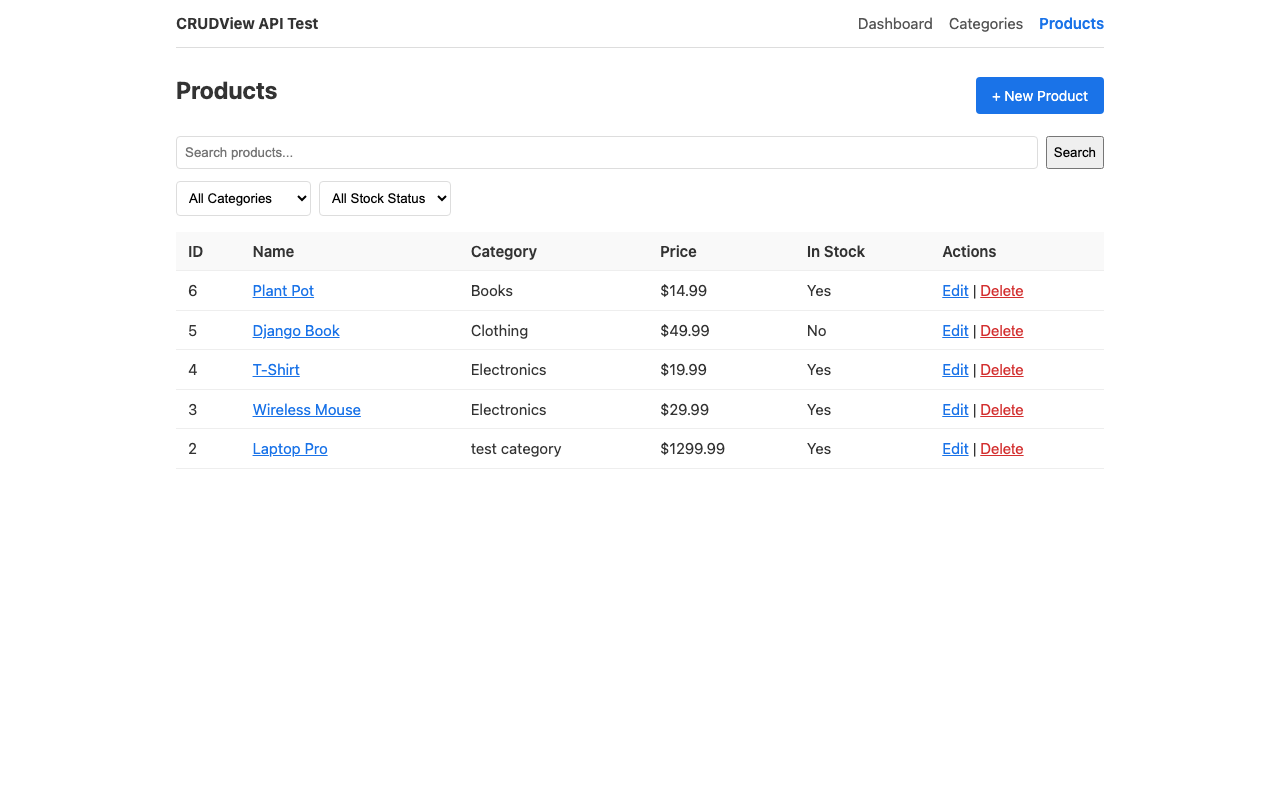
FK expansion: With
api_expand_fields = ["category"]on the CRUDView, the API returns"category": {"id": 1, "name": "Electronics"}instead of just1. Useprod.category?.namefor display. Categories are still fetched separately for the filter dropdown — expansion solves display, not option-list population.
Product Form
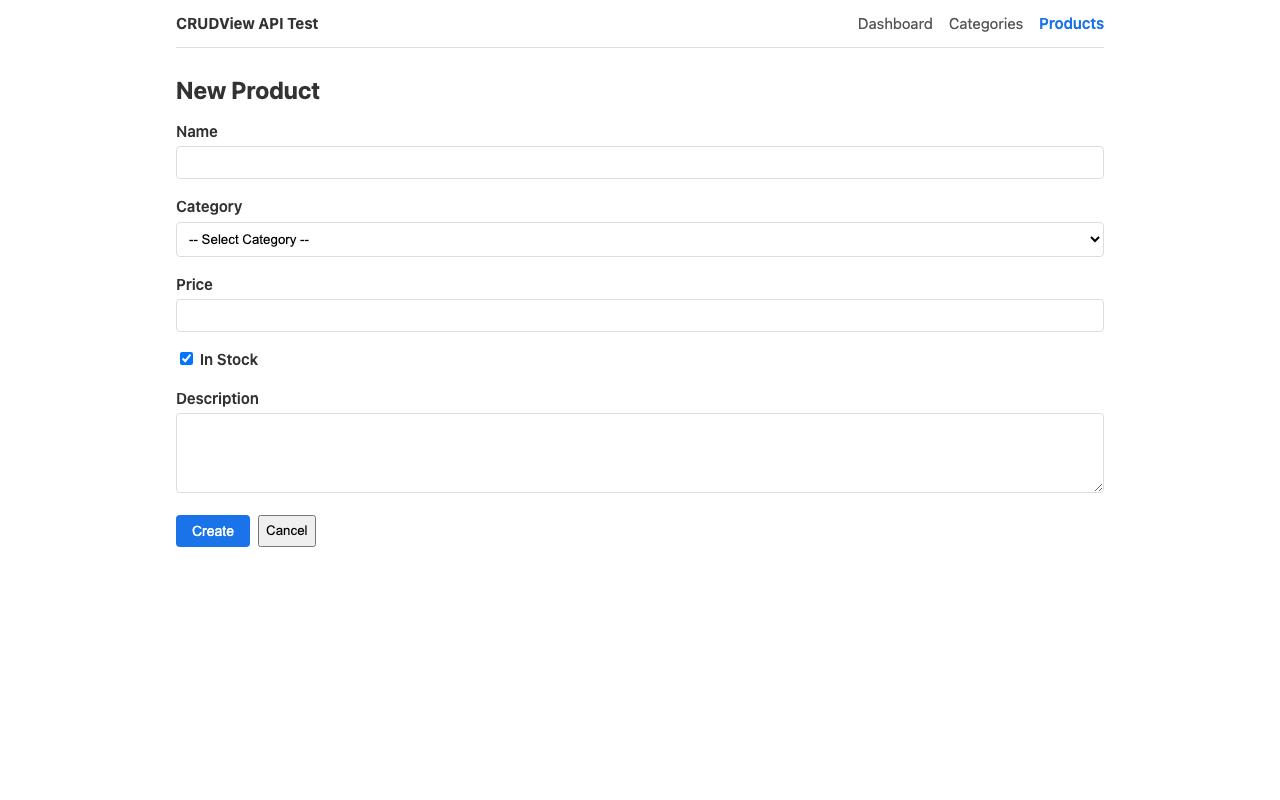
Create src/pages/ProductForm.jsx. The category dropdown is populated from the API:
import { useState, useEffect } from 'react';
import { useNavigate, useParams } from 'react-router-dom';
import { api } from '../api/client';
import ErrorDisplay from '../components/ErrorDisplay';

export default function ProductForm() {
  const { id } = useParams();
  const navigate = useNavigate();
  const isEdit = Boolean(id);

  const [form, setForm] = useState({
    name: '', category: '', price: '', in_stock: true, description: '',
  });
  const [categories, setCategories] = useState([]);
  const [error, setError] = useState(null);
  const [fieldErrors, setFieldErrors] = useState({});
  const [saving, setSaving] = useState(false);

  // Load categories for the dropdown
  useEffect(() => {
    api.listCategories()
      .then(result => setCategories(result.results))
      .catch(() => {});
  }, []);

  // Load existing product when editing
  useEffect(() => {
    if (isEdit) {
      api.getProduct(id)
        .then(data => setForm({
          name: data.name,
          category: String(typeof data.category === 'object' ? data.category.id : data.category),
          price: data.price,
          in_stock: data.in_stock,
          description: data.description || '',
        }))
        .catch(err => setError(err));
    }
  }, [id]);

  async function handleSubmit(e) {
    e.preventDefault();
    setSaving(true);
    setError(null);
    setFieldErrors({});
    try {
      const payload = {
        ...form,
        category: parseInt(form.category, 10) || null,
        price: form.price,
        in_stock: form.in_stock,
      };
      if (isEdit) {
        await api.updateProduct(id, payload);
      } else {
        await api.createProduct(payload);
      }
      navigate('/products');
    } catch (err) {
      if (err.data?.errors) {
        setFieldErrors(err.data.errors);
      }
      setError(err);
      setSaving(false);
    }
  }

  return (
    <div>
      <h1>{isEdit ? 'Edit Product' : 'New Product'}</h1>
      <ErrorDisplay error={error} />

      <form onSubmit={handleSubmit}>
        <div className="form-group">
          <label>Name</label>
          <input
            type="text"
            value={form.name}
            onChange={e => setForm({ ...form, name: e.target.value })}
          />
          {fieldErrors.name && (
            <span className="field-error">{fieldErrors.name.join(', ')}</span>
          )}
        </div>

        <div className="form-group">
          <label>Category</label>
          <select
            value={form.category}
            onChange={e => setForm({ ...form, category: e.target.value })}
          >
            <option value="">-- Select Category --</option>
            {categories.map(c => (
              <option key={c.id} value={c.id}>{c.name}</option>
            ))}
          </select>
          {fieldErrors.category && (
            <span className="field-error">{fieldErrors.category.join(', ')}</span>
          )}
        </div>

        <div className="form-group">
          <label>Price</label>
          <input
            type="number"
            step="0.01"
            value={form.price}
            onChange={e => setForm({ ...form, price: e.target.value })}
          />
          {fieldErrors.price && (
            <span className="field-error">{fieldErrors.price.join(', ')}</span>
          )}
        </div>

        <div className="form-group">
          <label>
            <input
              type="checkbox"
              checked={form.in_stock}
              onChange={e => setForm({ ...form, in_stock: e.target.checked })}
            />
            {' '}In Stock
          </label>
        </div>

        <div className="form-group">
          <label>Description</label>
          <textarea
            value={form.description}
            onChange={e => setForm({ ...form, description: e.target.value })}
          />
        </div>

        <div className="form-actions">
          <button type="submit" className="btn" disabled={saving}>
            {saving ? 'Saving...' : isEdit ? 'Update' : 'Create'}
          </button>
          <button type="button" onClick={() => navigate('/products')}>Cancel</button>
        </div>
      </form>
    </div>
  );
}
Step 9: Wire Up the App
Replace src/App.jsx:
import { BrowserRouter, Routes, Route, NavLink } from 'react-router-dom';
import Dashboard from './pages/Dashboard';
import CategoriesList from './pages/CategoriesList';
import CategoryForm from './pages/CategoryForm';
import ProductsList from './pages/ProductsList';
import ProductForm from './pages/ProductForm';
import './App.css';

function App() {
  return (
    <BrowserRouter>
      <div className="app">
        <nav className="topnav">
          <span className="brand">Inventory Manager</span>
          <NavLink to="/">Dashboard</NavLink>
          <NavLink to="/categories">Categories</NavLink>
          <NavLink to="/products">Products</NavLink>
        </nav>
        <main className="content">
          <Routes>
            <Route path="/" element={<Dashboard />} />
            <Route path="/categories" element={<CategoriesList />} />
            <Route path="/categories/new" element={<CategoryForm />} />
            <Route path="/categories/:id/edit" element={<CategoryForm />} />
            <Route path="/products" element={<ProductsList />} />
            <Route path="/products/new" element={<ProductForm />} />
            <Route path="/products/:id/edit" element={<ProductForm />} />
          </Routes>
        </main>
      </div>
    </BrowserRouter>
  );
}

export default App;
Replace src/index.css:
* { box-sizing: border-box; }

body {
  margin: 0;
  font-family: system-ui, -apple-system, sans-serif;
  font-size: 15px;
  line-height: 1.5;
  color: #333;
}

h1, h2 { margin: 0 0 12px; }
h1 { font-size: 24px; }
h2 { font-size: 18px; }
a { color: #1a73e8; }
Replace src/App.css:
.app { max-width: 960px; margin: 0 auto; padding: 0 16px; }

.topnav {
  display: flex; gap: 16px; align-items: center;
  padding: 12px 0; border-bottom: 1px solid #ddd; margin-bottom: 24px;
}
.topnav .brand { font-weight: bold; margin-right: auto; }
.topnav a { text-decoration: none; color: #555; }
.topnav a.active { color: #1a73e8; font-weight: 600; }

.page-header {
  display: flex; justify-content: space-between;
  align-items: center; margin-bottom: 16px;
}

.btn {
  background: #1a73e8; color: white; border: none;
  padding: 8px 16px; border-radius: 4px; cursor: pointer;
  text-decoration: none; font-size: 14px;
}
.btn:hover { background: #1557b0; }
.btn:disabled { opacity: 0.6; cursor: not-allowed; }

.btn-link {
  background: none; border: none; cursor: pointer;
  padding: 0; text-decoration: underline; font-size: inherit; color: #1a73e8;
}
.btn-link.danger { color: #d32f2f; }

table { width: 100%; border-collapse: collapse; margin-bottom: 16px; }
th, td { text-align: left; padding: 8px 12px; border-bottom: 1px solid #eee; }
th { font-weight: 600; background: #f9f9f9; }

.search-form { display: flex; gap: 8px; margin-bottom: 12px; }
.search-form input { flex: 1; padding: 8px; border: 1px solid #ddd; border-radius: 4px; }

.filters { display: flex; gap: 8px; margin-bottom: 16px; }
.filters select { padding: 8px; border: 1px solid #ddd; border-radius: 4px; }

.pagination {
  display: flex; gap: 12px; align-items: center;
  justify-content: center; padding: 12px 0;
}

.form-group { margin-bottom: 16px; }
.form-group label { display: block; font-weight: 600; margin-bottom: 4px; }
.form-group input[type="text"],
.form-group input[type="number"],
.form-group textarea,
.form-group select {
  width: 100%; padding: 8px; border: 1px solid #ddd;
  border-radius: 4px; box-sizing: border-box;
}
.form-group textarea { min-height: 80px; }
.form-actions { display: flex; gap: 8px; }

.field-error { color: #d32f2f; font-size: 13px; display: block; margin-top: 4px; }

.error-box {
  background: #fce4ec; color: #c62828;
  padding: 12px 16px; border-radius: 4px; margin-bottom: 16px;
}
.error-box ul { margin: 4px 0 0; padding-left: 20px; }

.stats-grid {
  display: grid; grid-template-columns: repeat(auto-fit, minmax(180px, 1fr));
  gap: 16px; margin-top: 16px;
}
.stat-card {
  background: #f9f9f9; border: 1px solid #eee;
  border-radius: 8px; padding: 20px; text-align: center;
}
.stat-card h2 { font-size: 36px; margin: 0; }
.stat-card p { color: #666; margin: 4px 0 8px; }
.stat-card a { color: #1a73e8; text-decoration: none; }
Step 10: Run It
Terminal 1 — Backend:
cd test_crud_api/backend
make run PORT=8020
Terminal 2 — Frontend:
cd test_crud_api/frontend
npm run dev
Open http://localhost:8021 and you should see the dashboard with live data from the API.
API Reference
Here's what SmallStack's CRUDView API gives you out of the box:
Endpoints
| Method | URL | Body | Response |
|---|---|---|---|
| GET | /api/{url_base}/ |
— | {"count", "next", "previous", "results": [...]} |
| POST | /api/{url_base}/ |
JSON object | 201 with created object |
| GET | /api/{url_base}/<id>/ |
— | JSON object |
| PATCH | /api/{url_base}/<id>/ |
Partial JSON | Updated object |
| PUT | /api/{url_base}/<id>/ |
Full JSON | Updated object |
| DELETE | /api/{url_base}/<id>/ |
— | 204 No Content |
Query Parameters
| Param | Example | Requires |
|---|---|---|
?q=term |
?q=laptop |
search_fields on CRUDView |
?field=value |
?category=1&in_stock=true |
filter_fields on CRUDView |
?page=N |
?page=2 |
Automatic (uses paginate_by) |
?format=csv |
?format=csv |
export_formats on CRUDView |
?expand=field1,field2 |
?expand=category |
api_expand_fields on CRUDView (always-on) or per-request |
?count_by=field |
?count_by=status |
Field must be in filter_fields |
?sum=field |
?sum=price |
Field must be in api_aggregate_fields |
?avg=field |
?avg=price |
Field must be in api_aggregate_fields |
?field__gte=date |
?created_at__gte=2026-03-01 |
Date fields in filter_fields (automatic) |
Error Responses
// 400 — Validation error (per-field messages)
{"errors": {"name": ["This field is required."], "price": ["Enter a number."]}}

// 401 — Bad or missing token
{"error": "Invalid token"}

// 403 — Insufficient permissions
{"error": "Staff access required"}

// 404 — Object not found
{"error": "Not found"}

// 405 — Action not enabled
{"error": "Method not allowed"}
CRUDView Configuration
class ProductCRUDView(CRUDView):
    model = Product
    fields = ["name", "category", "price"]    # Fields for forms + API
    url_base = "inventory/products"            # Generates /api/inventory/products/
    enable_api = True                          # Turns on the REST API
    search_fields = ["name", "description"]    # Enables ?q= search
    filter_fields = ["category", "in_stock", "created_at"]  # Enables filtering + date ranges
    api_extra_fields = ["created_at"]          # Read-only fields in API responses
    api_expand_fields = ["category"]           # FKs expanded as {"id", "name"} in responses
    api_aggregate_fields = ["price"]           # Enables ?sum=price, ?avg=price, etc.
    paginate_by = 25                           # Items per page
    actions = [Action.LIST, Action.CREATE, Action.DETAIL, Action.UPDATE, Action.DELETE]
Tips and Gotchas
FK expansion eliminates client-side joins
With api_expand_fields on your CRUDView, ForeignKey fields return objects instead of raw PKs:
// Without expansion: "category": 1
// With api_expand_fields = ["category"]: "category": {"id": 1, "name": "Electronics"}

// Display is simple:
<td>{prod.category?.name}</td>
You can also request expansion per-request with ?expand=category,owner — both server defaults and request params are merged.
Gotcha: Expanded FKs apply to all endpoints (list, detail, create response). When loading a record for editing, extract the ID:
category: String(typeof data.category === 'object' ? data.category.id : data.category)
Server-side aggregation replaces all-page fetching
Use ?count_by=, ?sum=, ?avg= instead of fetching every page to compute stats client-side:
// Before: fetch all pages, count in JavaScript (slow, inaccurate for large datasets)
const prods = await api.listProducts();
const inStock = prods.results.filter(p => p.in_stock).length; // First page only!

// After: server computes the real count in one request
const prods = await api.listProducts('count_by=in_stock');
const inStock = prods.counts['true'] || 0; // All products, always accurate
Fields for count_by must be in filter_fields. Fields for sum/avg/min/max must be in api_aggregate_fields.
Smart date filtering
Date fields in filter_fields automatically support range lookups:
?created_at__gte=2026-03-01                    → on or after March 1
?created_at__lte=2026-03-31                    → on or before March 31
?created_at__gte=2026-03-01&created_at__lte=2026-03-31  → March only
No configuration needed — any Date/DateTime field in filter_fields gets these lookups automatically.
PATCH for partial updates
Use PATCH (not PUT) when updating — it only requires the fields you're changing:
// Only update the price — all other fields stay the same
await api.updateProduct(id, { price: "29.99" });
Validation errors map to form fields
The errors object keys match your model field names, so you can display them inline:
catch (err) {
  if (err.data?.errors) {
    setFieldErrors(err.data.errors); // { name: ["..."], price: ["..."] }
  }
}

// In the template
{fieldErrors.name && <span className="field-error">{fieldErrors.name.join(', ')}</span>}
CORS is configured via environment variable
In .env, set CORS_ALLOWED_ORIGINS to your frontend's origin:
# Single origin
CORS_ALLOWED_ORIGINS=http://localhost:3000

# Multiple origins (comma-separated)
CORS_ALLOWED_ORIGINS=http://localhost:3000,http://localhost:5173
File Structure
test_crud_api/
├── backend/                          # SmallStack clone
│   ├── apps/inventory/
│   │   ├── models.py                 # Category + Product models
│   │   ├── views.py                  # CRUDViews with enable_api=True
│   │   ├── urls.py                   # URL wiring
│   │   ├── admin.py                  # Django admin registration
│   │   └── explorer.py               # Explorer registration
│   ├── config/settings/base.py       # INSTALLED_APPS + CORS config
│   ├── config/urls.py                # Include inventory URLs
│   └── .env                          # CORS_ALLOWED_ORIGINS
│
└── frontend/                         # React + Vite
    ├── .env                          # VITE_API_BASE_URL + VITE_API_TOKEN
    ├── vite.config.js                # Port 8021
    └── src/
        ├── api/client.js             # API client with auth + error handling
        ├── components/
        │   ├── ErrorDisplay.jsx       # Renders API errors
        │   └── Pagination.jsx         # Page navigation
        ├── pages/
        │   ├── Dashboard.jsx          # Stats overview
        │   ├── CategoriesList.jsx     # List + search + delete
        │   ├── CategoryForm.jsx       # Create + edit
        │   ├── ProductsList.jsx       # List + search + filter + delete
        │   └── ProductForm.jsx        # Create + edit with FK dropdown
        ├── App.jsx                    # Router + navigation
        ├── App.css                    # Styles
        └── index.css                  # Base styles