
Build a Svelte Dashboard with SmallStack's API
This tutorial walks you through building a SvelteKit dashboard that consumes SmallStack's CRUDView REST API. By the end, you'll have a working project management dashboard with charts, tables, search, filtering, and full CRUD — all powered by SmallStack's enable_api = True.
What you'll build:
- A Django backend with three related models (Project, Task, TimeEntry)
- CRUDViews with
enable_api = Truethat auto-generate REST endpoints - A SvelteKit frontend with a dashboard (stats, charts), list pages, forms, search, and filtering
Why Svelte for dashboards:
Svelte's reactive $derived and $state runes make it natural to compute dashboard stats from API data — change the data and every stat card, chart, and table updates automatically. No useEffect dependency arrays, no virtual DOM diffing. The compiled output is also smaller than React, which matters for dashboards with many components.
Prerequisites:
- Python 3.11+ with uv installed
- Node.js 18+
- Git
Ports used:
| Service | Port |
|---|---|
| Django backend | 8030 |
| SvelteKit frontend | 8031 |
Step 1: Clone and Set Up the Backend
mkdir ss-svelte
cd ss-svelte
git clone https://github.com/emichaud/django-smallstack.git backend
cd backend
Create your environment file:
cp .env.example .env
Edit .env and add the CORS setting — this allows the Svelte dev server to call the API:
CORS_ALLOWED_ORIGINS=http://localhost:8031
Run the setup command. This installs dependencies, runs migrations, and creates a dev superuser (admin/admin):
make setup
Start the backend on port 8030:
make run PORT=8030
Verify it works. Open http://localhost:8030/health/ — you should see:
{"status": "ok", "database": "ok"}
Step 2: Create Your Models
We'll build a project tracker with three models — ideal for a dashboard because they provide rich aggregate data.
Create a new Django app:
mkdir -p apps/dashboard
uv run python manage.py startapp dashboard apps/dashboard
Fix the app config
Edit apps/dashboard/apps.py — you must set name to "apps.dashboard":
from django.apps import AppConfig


class DashboardConfig(AppConfig):
    default_auto_field = "django.db.models.BigAutoField"
    name = "apps.dashboard"
    verbose_name = "Dashboard"
Add models
Replace apps/dashboard/models.py:
from django.conf import settings
from django.db import models


class Project(models.Model):
    name = models.CharField(max_length=200)
    description = models.TextField(blank=True)
    status = models.CharField(
        max_length=20,
        choices=[
            ("active", "Active"),
            ("paused", "Paused"),
            ("completed", "Completed"),
            ("archived", "Archived"),
        ],
        default="active",
    )
    owner = models.ForeignKey(
        settings.AUTH_USER_MODEL,
        on_delete=models.CASCADE,
        related_name="projects",
    )
    budget = models.DecimalField(max_digits=10, decimal_places=2, default=0)
    created_at = models.DateTimeField(auto_now_add=True)
    updated_at = models.DateTimeField(auto_now=True)

    class Meta:
        ordering = ["-created_at"]

    def __str__(self):
        return self.name


class Task(models.Model):
    title = models.CharField(max_length=300)
    project = models.ForeignKey(
        Project, on_delete=models.CASCADE, related_name="tasks"
    )
    assignee = models.ForeignKey(
        settings.AUTH_USER_MODEL,
        on_delete=models.SET_NULL,
        null=True,
        blank=True,
        related_name="assigned_tasks",
    )
    status = models.CharField(
        max_length=20,
        choices=[
            ("todo", "To Do"),
            ("in_progress", "In Progress"),
            ("review", "In Review"),
            ("done", "Done"),
        ],
        default="todo",
    )
    priority = models.CharField(
        max_length=10,
        choices=[
            ("low", "Low"),
            ("medium", "Medium"),
            ("high", "High"),
            ("urgent", "Urgent"),
        ],
        default="medium",
    )
    due_date = models.DateField(null=True, blank=True)
    estimated_hours = models.DecimalField(
        max_digits=6, decimal_places=1, default=0
    )
    created_at = models.DateTimeField(auto_now_add=True)
    updated_at = models.DateTimeField(auto_now=True)

    class Meta:
        ordering = ["-created_at"]

    def __str__(self):
        return self.title


class TimeEntry(models.Model):
    task = models.ForeignKey(
        Task, on_delete=models.CASCADE, related_name="time_entries"
    )
    user = models.ForeignKey(
        settings.AUTH_USER_MODEL,
        on_delete=models.CASCADE,
        related_name="time_entries",
    )
    hours = models.DecimalField(max_digits=5, decimal_places=1)
    date = models.DateField()
    note = models.CharField(max_length=500, blank=True)
    created_at = models.DateTimeField(auto_now_add=True)

    class Meta:
        ordering = ["-date", "-created_at"]
        verbose_name_plural = "time entries"

    def __str__(self):
        return f"{self.hours}h on {self.date}"
Register the app
Add "apps.dashboard" to INSTALLED_APPS in config/settings/base.py:
INSTALLED_APPS = [
    # ...existing apps...
    "apps.dashboard",
    "apps.website",
    # ...
]
Run migrations
uv run python manage.py makemigrations dashboard
uv run python manage.py migrate
Step 3: Create CRUDViews with API Enabled
Create apps/dashboard/views.py:
from apps.smallstack.crud import Action, CRUDView
from apps.smallstack.displays import TableDisplay
from apps.smallstack.mixins import StaffRequiredMixin

from .models import Project, Task, TimeEntry


class ProjectCRUDView(CRUDView):
    model = Project
    fields = ["name", "description", "status", "owner", "budget"]
    url_base = "dashboard/projects"
    paginate_by = 25
    mixins = [StaffRequiredMixin]
    displays = [TableDisplay]
    actions = [Action.LIST, Action.CREATE, Action.DETAIL, Action.UPDATE, Action.DELETE]
    enable_api = True
    search_fields = ["name", "description"]
    filter_fields = ["status", "owner", "created_at"]
    api_extra_fields = ["created_at", "updated_at"]
    api_expand_fields = ["owner"]
    api_aggregate_fields = ["budget"]


class TaskCRUDView(CRUDView):
    model = Task
    fields = ["title", "project", "assignee", "status", "priority", "due_date", "estimated_hours"]
    url_base = "dashboard/tasks"
    paginate_by = 25
    mixins = [StaffRequiredMixin]
    displays = [TableDisplay]
    actions = [Action.LIST, Action.CREATE, Action.DETAIL, Action.UPDATE, Action.DELETE]
    enable_api = True
    search_fields = ["title"]
    filter_fields = ["project", "status", "priority", "assignee", "due_date", "created_at"]
    api_extra_fields = ["created_at", "updated_at"]
    api_expand_fields = ["project", "assignee"]
    api_aggregate_fields = ["estimated_hours"]


class TimeEntryCRUDView(CRUDView):
    model = TimeEntry
    fields = ["task", "user", "hours", "date", "note"]
    url_base = "dashboard/time-entries"
    paginate_by = 25
    mixins = [StaffRequiredMixin]
    displays = [TableDisplay]
    actions = [Action.LIST, Action.CREATE, Action.DETAIL, Action.UPDATE, Action.DELETE]
    enable_api = True
    search_fields = ["note"]
    filter_fields = ["task", "user", "date"]
    api_extra_fields = ["created_at"]
    api_expand_fields = ["task", "user"]
    api_aggregate_fields = ["hours"]
What enable_api = True generates for each model:
| HTTP Method | URL | Purpose |
|---|---|---|
| GET | /api/dashboard/projects/ |
List (paginated, searchable, filterable) |
| POST | /api/dashboard/projects/ |
Create |
| GET | /api/dashboard/projects/<id>/ |
Get one |
| PUT/PATCH | /api/dashboard/projects/<id>/ |
Update |
| DELETE | /api/dashboard/projects/<id>/ |
Delete |
Note on api_extra_fields: By default, API responses only include fields from fields. Timestamps like created_at are auto-set and shouldn't appear in create/edit forms. api_extra_fields adds them as read-only fields in API responses without polluting forms.
New API attributes:
api_expand_fields— FK fields listed here are automatically expanded. Instead of"project": 1, the API returns"project": {"id": 1, "name": "Website Redesign"}. Eliminates the need for client-side FK lookup maps.api_aggregate_fields— Enables server-side aggregation:?sum=hours,?avg=hours,?min=hours,?max=hours.- Date fields in
filter_fields— automatically get range lookups:?created_at__gte=2026-03-01&created_at__lte=2026-03-31. ?count_by=field— Group counts by any field infilter_fields:?count_by=statusreturns{"counts": {"todo": 30, "done": 12}}.
Wire the URLs
Create apps/dashboard/urls.py:
from .views import ProjectCRUDView, TaskCRUDView, TimeEntryCRUDView

app_name = "dashboard"

urlpatterns = [
    *ProjectCRUDView.get_urls(),
    *TaskCRUDView.get_urls(),
    *TimeEntryCRUDView.get_urls(),
]
Add to config/urls.py (before the website include):
urlpatterns = [
    # Dashboard CRUD + API
    path("", include("apps.dashboard.urls")),
    # Project pages
    path("", include("apps.website.urls")),
    # ...rest of URLs...
]
Step 4: Create an API Token and Seed Data
Generate a Bearer token:
uv run python manage.py create_api_token admin
Output:
Token created for admin:

  cUOMvR6LuiIxRYbucaPwmdjlbOdoYqIeVkMlFrs4m4M

Save this key — it cannot be retrieved later.
Copy this token. You'll need it for the Svelte app.
Seed sample data
Create a management command to populate dashboard-friendly data. Create apps/dashboard/management/commands/seed_dashboard.py (you'll also need __init__.py files in management/ and commands/):
import random
from datetime import date, timedelta

from django.contrib.auth import get_user_model
from django.core.management.base import BaseCommand

from apps.dashboard.models import Project, Task, TimeEntry

User = get_user_model()

PROJECTS = [
    ("Website Redesign", "Modernize the company website", "active", 45000),
    ("Mobile App v2", "Native iOS and Android rewrite", "active", 120000),
    ("Data Pipeline", "ETL pipeline for analytics", "completed", 30000),
    ("API Gateway", "Centralized API with rate limiting", "active", 25000),
    ("DevOps Automation", "CI/CD and infrastructure as code", "paused", 18000),
    ("Customer Portal", "Self-service portal for clients", "active", 60000),
]

TASK_TEMPLATES = [
    ("Set up project scaffold", "done", "low", 4),
    ("Design database schema", "done", "medium", 8),
    ("Implement authentication", "done", "high", 16),
    ("Build API endpoints", "in_progress", "high", 24),
    ("Create frontend components", "in_progress", "medium", 20),
    ("Write unit tests", "in_progress", "medium", 12),
    ("Integration testing", "todo", "high", 8),
    ("Performance optimization", "todo", "medium", 6),
    ("Documentation", "todo", "low", 4),
    ("Security audit", "review", "urgent", 10),
    ("Deploy to staging", "todo", "high", 4),
    ("User acceptance testing", "todo", "medium", 8),
]


class Command(BaseCommand):
    help = "Seed dashboard with sample data"

    def handle(self, *args, **options):
        admin = User.objects.filter(is_staff=True).first()
        if not admin:
            self.stderr.write("No staff user found.")
            return

        for name, desc, status, budget in PROJECTS:
            proj, _ = Project.objects.get_or_create(
                name=name,
                defaults={"description": desc, "status": status, "owner": admin, "budget": budget},
            )
            if not proj.tasks.exists():
                for title, t_status, priority, hours in TASK_TEMPLATES:
                    Task.objects.create(
                        title=f"{title} - {proj.name}",
                        project=proj, assignee=admin, status=t_status,
                        priority=priority, estimated_hours=hours,
                        due_date=date.today() + timedelta(days=random.randint(-10, 30)),
                    )

        for task in Task.objects.filter(status__in=["done", "in_progress", "review"]):
            if not task.time_entries.exists():
                for _ in range(random.randint(2, 6)):
                    TimeEntry.objects.create(
                        task=task, user=admin,
                        hours=round(random.uniform(0.5, 8.0), 1),
                        date=date.today() - timedelta(days=random.randint(0, 30)),
                        note=random.choice(["Core logic", "Code review", "Bug fixing", "Testing", "Documentation"]),
                    )

        self.stdout.write(self.style.SUCCESS("Dashboard seeded successfully"))
Run it:
uv run python manage.py seed_dashboard
Verify the API
curl -H "Authorization: Bearer YOUR_TOKEN" http://localhost:8030/api/dashboard/projects/

# Test filtering
curl -H "Authorization: Bearer YOUR_TOKEN" "http://localhost:8030/api/dashboard/tasks/?status=in_progress"

# Test search
curl -H "Authorization: Bearer YOUR_TOKEN" "http://localhost:8030/api/dashboard/tasks/?q=authentication"
Step 5: Create the SvelteKit Frontend
Open a new terminal. From the ss-svelte directory:
npx sv create frontend --template minimal --types ts --no-add-ons
cd frontend
Configure the port
Edit vite.config.ts:
import { sveltekit } from '@sveltejs/kit/vite';
import { defineConfig } from 'vite';

export default defineConfig({
    plugins: [sveltekit()],
    server: { port: 8031 }
});
Store the API token
Create frontend/.env:
VITE_API_BASE_URL=http://localhost:8030/api
VITE_API_TOKEN=YOUR_TOKEN_HERE
Note: In production, use a login flow. For development, env vars are fine.
Step 6: Build the API Client
Create src/lib/api.ts — a typed wrapper around fetch:
const BASE_URL = import.meta.env.VITE_API_BASE_URL || 'http://localhost:8030/api';
const TOKEN = import.meta.env.VITE_API_TOKEN || '';

export class ApiError extends Error {
    status: number;
    data: any;

    constructor(status: number, data: any) {
        super(`API Error ${status}`);
        this.status = status;
        this.data = data;
    }
}

async function request(path: string, options: RequestInit & { body?: any } = {}) {
    const url = `${BASE_URL}${path}`;
    const headers: Record<string, string> = {
        Authorization: `Bearer ${TOKEN}`,
        ...(options.headers as Record<string, string>)
    };

    if (options.body && typeof options.body === 'object' && !(options.body instanceof FormData)) {
        headers['Content-Type'] = 'application/json';
        options.body = JSON.stringify(options.body);
    }

    const response = await fetch(url, { ...options, headers });

    if (response.status === 204) return null;

    const data = await response.json().catch(() => null);

    if (!response.ok) {
        throw new ApiError(response.status, data);
    }

    return data;
}

// Type definitions matching SmallStack API responses
export interface ExpandedFK {
    id: number;
    name: string;
}

export interface PaginatedResponse<T> {
    count: number;
    page: number;
    total_pages: number;
    next: string | null;
    previous: string | null;
    results: T[];
    // Aggregation fields (present when requested)
    counts?: Record<string, number>;
    [key: string]: any;  // sum_hours, avg_hours, etc.
}

export interface Project {
    id: number;
    name: string;
    description: string;
    status: string;
    owner: number | ExpandedFK;
    budget: string;
    created_at: string;
    updated_at: string;
}

export interface Task {
    id: number;
    title: string;
    project: number | ExpandedFK;    // Expanded via api_expand_fields
    assignee: number | ExpandedFK | null;
    status: string;
    priority: string;
    due_date: string | null;
    estimated_hours: string;
    created_at: string;
    updated_at: string;
}

export interface TimeEntry {
    id: number;
    task: number | ExpandedFK;       // Expanded via api_expand_fields
    user: number | ExpandedFK;
    hours: string;
    date: string;
    note: string;
    created_at: string;
}

function buildParams(params: Record<string, string | number | undefined>): string {
    const p = new URLSearchParams();
    for (const [k, v] of Object.entries(params)) {
        if (v !== undefined && v !== '') p.set(k, String(v));
    }
    const s = p.toString();
    return s ? `?${s}` : '';
}

export const api = {
    // Projects
    listProjects: (params = {}): Promise<PaginatedResponse<Project>> =>
        request(`/dashboard/projects/${buildParams(params)}`),
    getProject: (id: number): Promise<Project> =>
        request(`/dashboard/projects/${id}/`),
    createProject: (data: Partial<Project>) =>
        request('/dashboard/projects/', { method: 'POST', body: data }),
    updateProject: (id: number, data: Partial<Project>) =>
        request(`/dashboard/projects/${id}/`, { method: 'PATCH', body: data }),
    deleteProject: (id: number) =>
        request(`/dashboard/projects/${id}/`, { method: 'DELETE' }),

    // Tasks
    listTasks: (params = {}): Promise<PaginatedResponse<Task>> =>
        request(`/dashboard/tasks/${buildParams(params)}`),
    getTask: (id: number): Promise<Task> =>
        request(`/dashboard/tasks/${id}/`),
    createTask: (data: Partial<Task>) =>
        request('/dashboard/tasks/', { method: 'POST', body: data }),
    updateTask: (id: number, data: Partial<Task>) =>
        request(`/dashboard/tasks/${id}/`, { method: 'PATCH', body: data }),
    deleteTask: (id: number) =>
        request(`/dashboard/tasks/${id}/`, { method: 'DELETE' }),

    // Time Entries
    listTimeEntries: (params = {}): Promise<PaginatedResponse<TimeEntry>> =>
        request(`/dashboard/time-entries/${buildParams(params)}`),
    getTimeEntry: (id: number): Promise<TimeEntry> =>
        request(`/dashboard/time-entries/${id}/`),
    createTimeEntry: (data: Partial<TimeEntry>) =>
        request('/dashboard/time-entries/', { method: 'POST', body: data }),
    updateTimeEntry: (id: number, data: Partial<TimeEntry>) =>
        request(`/dashboard/time-entries/${id}/`, { method: 'PATCH', body: data }),
    deleteTimeEntry: (id: number) =>
        request(`/dashboard/time-entries/${id}/`, { method: 'DELETE' }),
};
Key differences from the React version:
- TypeScript interfaces for every API type — Svelte 5 + TS gives you autocomplete on
task.project,entry.hours, etc. PaginatedResponse<T>generic — the list response shape is always the same, only the item type changesbuildParamshelper — cleaner than manually constructing URLSearchParamsExpandedFKtype — FK fields can be either a plain number or{"id": number, "name": string}depending onapi_expand_fieldsPaginatedResponseincludes aggregation —counts,sum_*,avg_*fields are present when aggregation params are used
Step 7: Build Reusable Components
Error Display
Create src/lib/components/ErrorDisplay.svelte:
<script lang="ts">
    import { ApiError } from '$lib/api';

    let { error }: { error: any } = $props();
</script>

{#if error}
    <div class="error-box">
        {#if error instanceof ApiError && error.data?.errors}
            <strong>Validation Errors:</strong>
            <ul style="margin: 4px 0 0; padding-left: 20px;">
                {#each Object.entries(error.data.errors) as [field, messages]}
                    <li><strong>{field}:</strong> {Array.isArray(messages) ? messages.join(', ') : messages}</li>
                {/each}
            </ul>
        {:else if error instanceof ApiError && error.data?.error}
            {error.data.error}
        {:else}
            {error.message || 'An error occurred'}
        {/if}
    </div>
{/if}
SmallStack returns validation errors as {"errors": {"field": ["message"]}}. The {#each Object.entries()} pattern iterates the error object directly — no Object.keys().map() wrapper needed like in React.
Pagination
Create src/lib/components/Pagination.svelte:
<script lang="ts">
    let { count, next, previous, page, onPageChange }: {
        count: number;
        next: string | null;
        previous: string | null;
        page: number;
        onPageChange: (page: number) => void;
    } = $props();
</script>

{#if next || previous}
    <div class="pagination">
        <button disabled={!previous} onclick={() => onPageChange(page - 1)}>Previous</button>
        <span>Page {page} ({count} total)</span>
        <button disabled={!next} onclick={() => onPageChange(page + 1)}>Next</button>
    </div>
{/if}
Step 8: Build the Dashboard Page
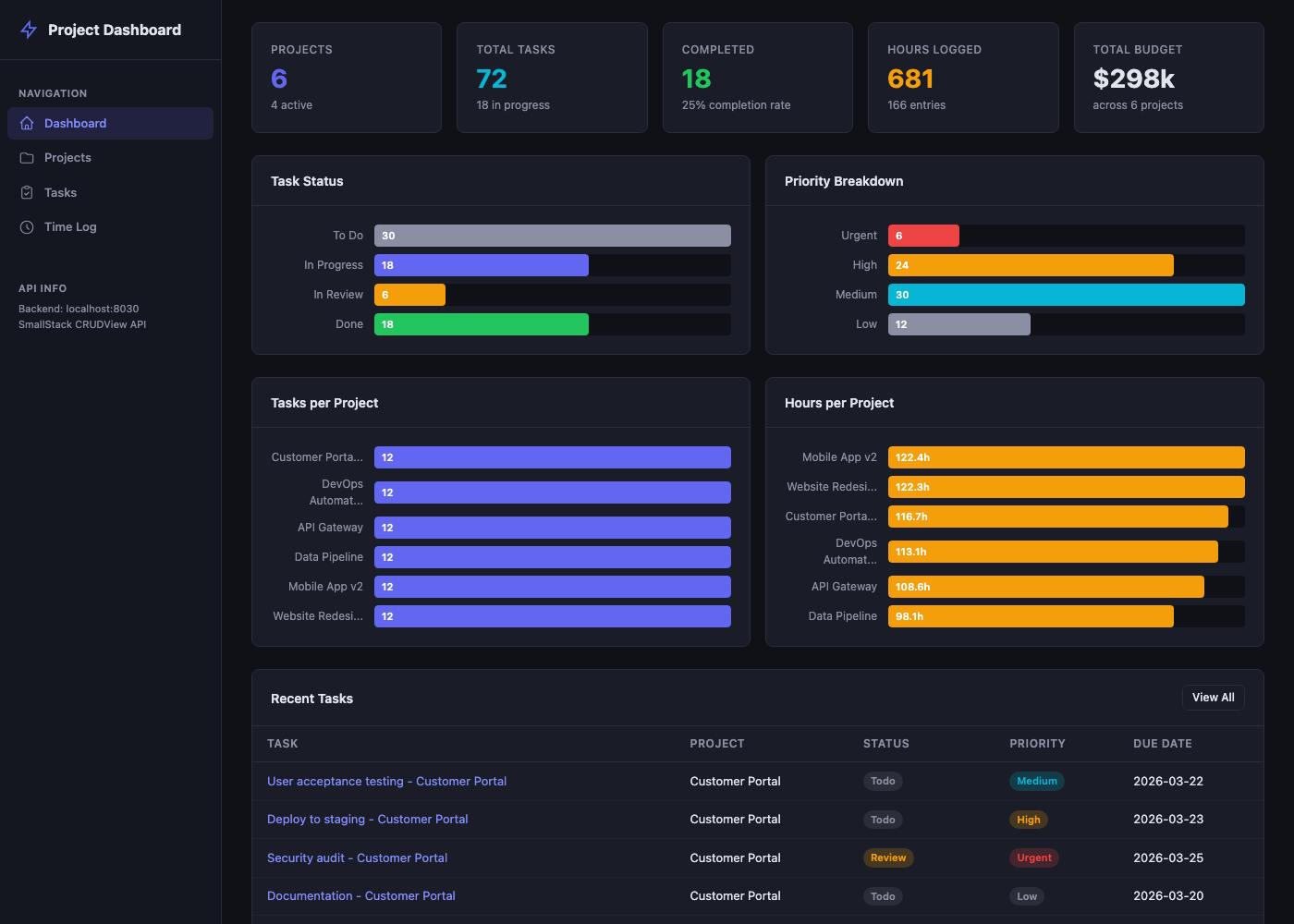
This is where Svelte shines. Replace src/routes/+page.svelte:
<script lang="ts">
    import { onMount } from 'svelte';
    import { api, type Project, type Task } from '$lib/api';

    let projects = $state<Project[]>([]);
    let recentTasks = $state<Task[]>([]);
    let loading = $state(true);
    let error = $state<string | null>(null);

    // Server-side aggregation results
    let taskCount = $state(0);
    let taskStatusCounts = $state<Record<string, number>>({});
    let totalHours = $state<number | null>(null);
    let timeEntryCount = $state(0);
    let totalBudget = $state<number | null>(null);

    // Derived stats from server aggregation
    let projectStats = $derived({
        total: projects.length,
        active: projects.filter(p => p.status === 'active').length,
        totalBudget: totalBudget ?? 0,
    });

    let taskStats = $derived({
        total: taskCount,
        todo: taskStatusCounts['todo'] || 0,
        inProgress: taskStatusCounts['in_progress'] || 0,
        review: taskStatusCounts['review'] || 0,
        done: taskStatusCounts['done'] || 0,
    });

    // Chart data — derived from aggregation counts
    let taskStatusData = $derived([
        { label: 'To Do', count: taskStats.todo, color: 'var(--text-muted)' },
        { label: 'In Progress', count: taskStats.inProgress, color: 'var(--primary)' },
        { label: 'In Review', count: taskStats.review, color: 'var(--warning)' },
        { label: 'Done', count: taskStats.done, color: 'var(--success)' },
    ]);

    onMount(async () => {
        try {
            // Server-side aggregation — no multi-page fetching needed
            const [projectsRes, tasksByStatus, timeAgg, budgetAgg] = await Promise.all([
                api.listProjects({ page: 1 }),
                api.listTasks({ count_by: 'status' }),
                api.listTimeEntries({ sum: 'hours' }),
                api.listProjects({ sum: 'budget' }),
            ]);

            projects = projectsRes.results;
            recentTasks = tasksByStatus.results.slice(0, 8);
            taskCount = tasksByStatus.count;
            taskStatusCounts = tasksByStatus.counts || {};
            totalHours = timeAgg.sum_hours ?? null;
            timeEntryCount = timeAgg.count;
            totalBudget = budgetAgg.sum_budget ?? null;
        } catch (e: any) {
            error = e.message || 'Failed to load dashboard data';
        } finally {
            loading = false;
        }
    });
</script>

{#if loading}
    <div class="loading">Loading dashboard...</div>
{:else if error}
    <div class="error-box">{error}</div>
{:else}
    <!-- Stat Cards -->
    <div class="stats-grid">
        <div class="stat-card">
            <div class="stat-label">Projects</div>
            <div class="stat-value" style="color: var(--primary)">{projectStats.total}</div>
            <div class="stat-sub">{projectStats.active} active</div>
        </div>
        <div class="stat-card">
            <div class="stat-label">Total Tasks</div>
            <div class="stat-value" style="color: var(--info)">{taskStats.total}</div>
            <div class="stat-sub">{taskStats.inProgress} in progress</div>
        </div>
        <div class="stat-card">
            <div class="stat-label">Completed</div>
            <div class="stat-value" style="color: var(--success)">{taskStats.done}</div>
            <div class="stat-sub">
                {taskStats.total > 0 ? Math.round(taskStats.done / taskStats.total * 100) : 0}% rate
            </div>
        </div>
        <div class="stat-card">
            <div class="stat-label">Hours Logged</div>
            <div class="stat-value" style="color: var(--warning)">{(totalHours ?? 0).toFixed(0)}</div>
            <div class="stat-sub">{timeEntryCount} entries</div>
        </div>
        <div class="stat-card">
            <div class="stat-label">Total Budget</div>
            <div class="stat-value">${((projectStats.totalBudget) / 1000).toFixed(0)}k</div>
        </div>
    </div>

    <!-- Bar Chart -->
    <div class="chart-grid">
        <div class="card">
            <div class="card-header">Task Status</div>
            <div class="card-body">
                <div class="bar-chart">
                    {#each taskStatusData as item}
                        {@const maxCount = Math.max(...taskStatusData.map(d => d.count), 1)}
                        <div class="bar-row">
                            <div class="bar-label">{item.label}</div>
                            <div class="bar-track">
                                <div class="bar-fill"
                                     style="width: {item.count / maxCount * 100}%; background: {item.color}">
                                    {#if item.count > 0}{item.count}{/if}
                                </div>
                            </div>
                        </div>
                    {/each}
                </div>
            </div>
        </div>
    </div>

    <!-- Recent Tasks -->
    <div class="card">
        <div class="card-header">
            Recent Tasks
            <a href="/tasks" class="btn btn-sm">View All</a>
        </div>
        <table>
            <thead>
                <tr>
                    <th>Task</th>
                    <th>Project</th>
                    <th>Status</th>
                    <th>Priority</th>
                </tr>
            </thead>
            <tbody>
                {#each recentTasks as task}
                    <tr>
                        <td><a href="/tasks/{task.id}/edit">{task.title}</a></td>
                        <td>{typeof task.project === 'object' ? task.project.name : `#${task.project}`}</td>
                        <td><span class="badge badge-{task.status}">{task.status.replace('_', ' ')}</span></td>
                        <td><span class="badge badge-{task.priority}">{task.priority}</span></td>
                    </tr>
                {/each}
            </tbody>
        </table>
    </div>
{/if}
What makes this efficient:
- Server-side aggregation —
?count_by=statusand?sum=hourscompute stats on the server. No multi-page fetching, no matter how large the dataset. - 4 parallel requests replace 10-15 sequential ones —
Promise.allfires everything at once $derivedstill shines — computed chart data reacts to the aggregation results automatically- FK expansion — tasks arrive with
project: {"id": 1, "name": "..."}inline, so the recent tasks table doesn't need a separate project lookup
Step 9: Build the List Pages
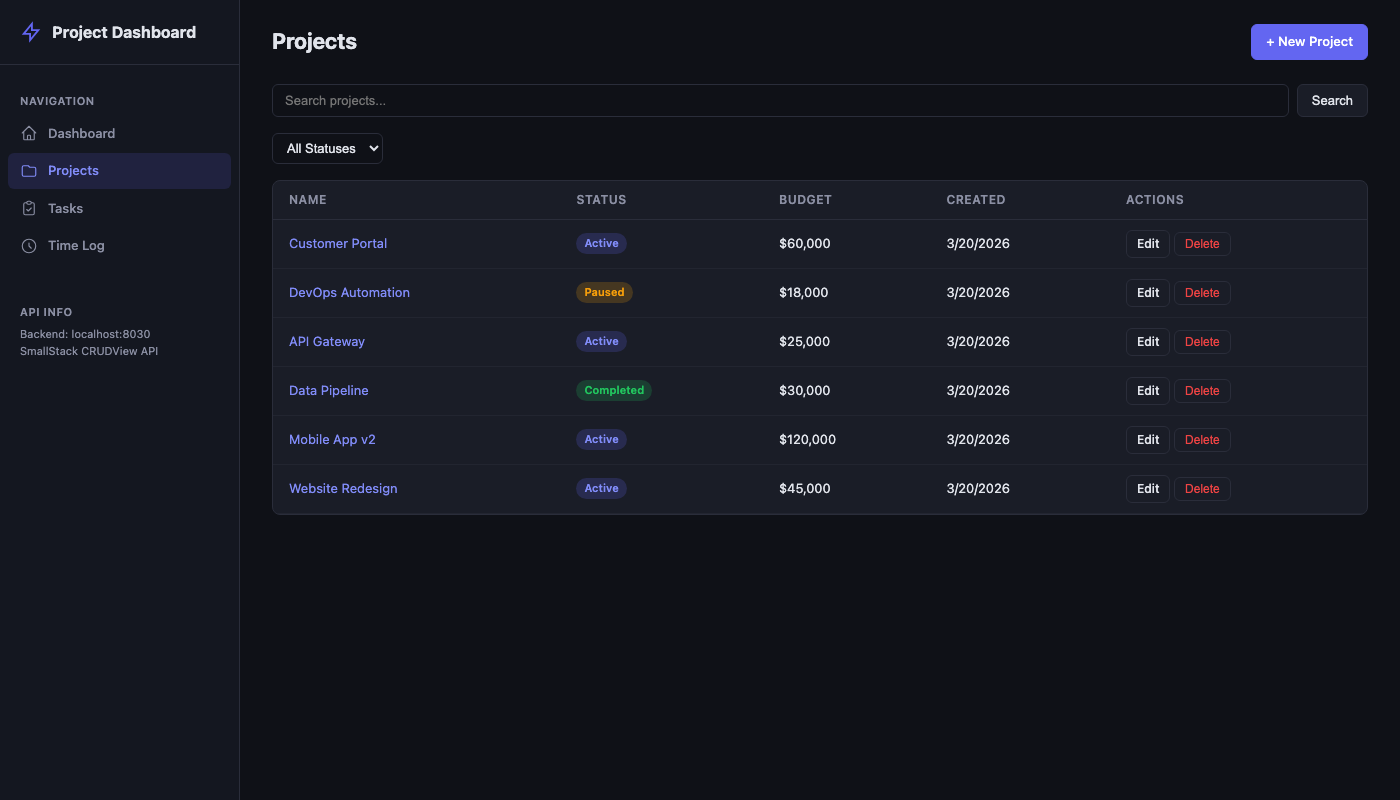
Projects List
Create src/routes/projects/+page.svelte:
<script lang="ts">
    import { onMount } from 'svelte';
    import { goto } from '$app/navigation';
    import { page } from '$app/state';
    import { api, type Project } from '$lib/api';
    import Pagination from '$lib/components/Pagination.svelte';
    import ErrorDisplay from '$lib/components/ErrorDisplay.svelte';

    let data = $state<{ count: number; next: string | null; previous: string | null; results: Project[] } | null>(null);
    let error = $state<any>(null);
    let search = $state(page.url.searchParams.get('q') || '');
    let statusFilter = $state(page.url.searchParams.get('status') || '');
    let currentPage = $state(parseInt(page.url.searchParams.get('page') || '1', 10));

    async function load() {
        try {
            error = null;
            const params: Record<string, string | number | undefined> = {};
            if (currentPage > 1) params.page = currentPage;
            if (search) params.q = search;
            if (statusFilter) params.status = statusFilter;
            data = await api.listProjects(params);
        } catch (e) {
            error = e;
        }
    }

    onMount(() => load());

    function handleSearch(e: Event) {
        e.preventDefault();
        currentPage = 1;
        load();
    }

    function handleFilterChange() {
        currentPage = 1;
        load();
    }

    async function handleDelete(id: number) {
        if (!confirm('Delete this project?')) return;
        try {
            await api.deleteProject(id);
            load();
        } catch (e) {
            error = e;
        }
    }
</script>

<div class="page-header">
    <h1>Projects</h1>
    <a href="/projects/new" class="btn btn-primary">+ New Project</a>
</div>

<form class="search-bar" onsubmit={handleSearch}>
    <input type="text" placeholder="Search projects..." bind:value={search} />
    <button class="btn" type="submit">Search</button>
</form>

<div class="filters">
    <select bind:value={statusFilter} onchange={handleFilterChange}>
        <option value="">All Statuses</option>
        <option value="active">Active</option>
        <option value="paused">Paused</option>
        <option value="completed">Completed</option>
        <option value="archived">Archived</option>
    </select>
</div>

<ErrorDisplay {error} />

{#if data}
    <div class="card">
        <table>
            <thead>
                <tr>
                    <th>Name</th>
                    <th>Status</th>
                    <th>Budget</th>
                    <th>Created</th>
                    <th>Actions</th>
                </tr>
            </thead>
            <tbody>
                {#each data.results as project}
                    <tr>
                        <td><a href="/projects/{project.id}/edit">{project.name}</a></td>
                        <td><span class="badge badge-{project.status}">{project.status}</span></td>
                        <td>${parseFloat(project.budget).toLocaleString()}</td>
                        <td>{new Date(project.created_at).toLocaleDateString()}</td>
                        <td>
                            <a href="/projects/{project.id}/edit" class="btn btn-sm">Edit</a>
                            <button class="btn btn-sm btn-danger" onclick={() => handleDelete(project.id)}>Delete</button>
                        </td>
                    </tr>
                {:else}
                    <tr><td colspan="5" class="empty">No projects found.</td></tr>
                {/each}
            </tbody>
        </table>
    </div>
    <Pagination count={data.count} next={data.next} previous={data.previous} page={currentPage}
        onPageChange={(p) => { currentPage = p; load(); }} />
{:else if !error}
    <div class="loading">Loading...</div>
{/if}
Tasks List (with FK expansion and multi-filter)
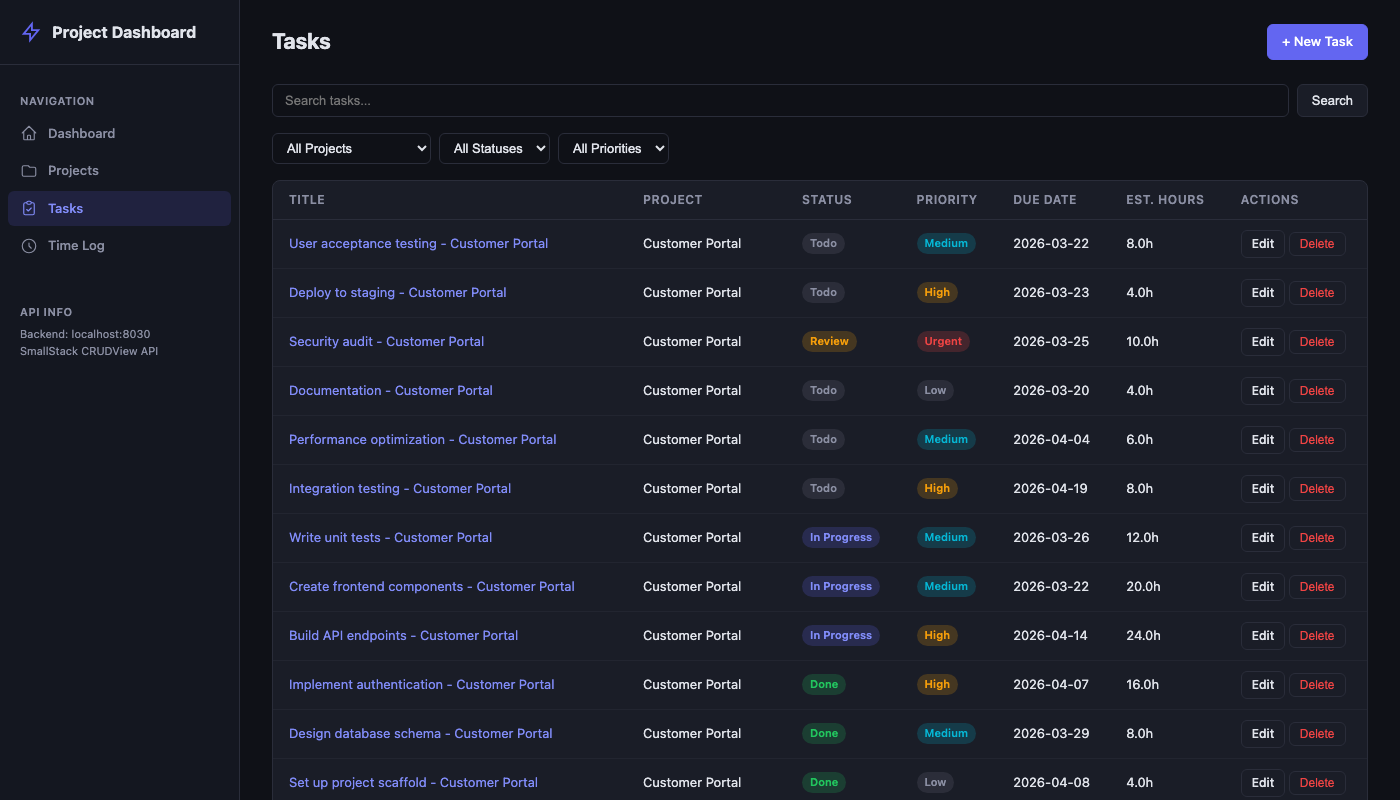
Create src/routes/tasks/+page.svelte. With api_expand_fields = ["project"] on the CRUDView, the API returns project: {"id": 1, "name": "Website Redesign"} inline — no separate fetch needed for display. Projects are still fetched for the filter dropdown:
<script lang="ts">
    import { onMount } from 'svelte';
    import { api, type Task, type Project } from '$lib/api';
    import Pagination from '$lib/components/Pagination.svelte';
    import ErrorDisplay from '$lib/components/ErrorDisplay.svelte';

    let data = $state<{ count: number; next: string | null; previous: string | null; results: Task[] } | null>(null);
    let projects = $state<Project[]>([]);
    let error = $state<any>(null);
    let statusFilter = $state('');
    let priorityFilter = $state('');
    let projectFilter = $state('');
    let currentPage = $state(1);

    async function load() {
        try {
            error = null;
            const params: Record<string, string | number | undefined> = {};
            if (currentPage > 1) params.page = currentPage;
            if (statusFilter) params.status = statusFilter;
            if (priorityFilter) params.priority = priorityFilter;
            if (projectFilter) params.project = projectFilter;
            data = await api.listTasks(params);
        } catch (e) {
            error = e;
        }
    }

    onMount(async () => {
        // Fetch projects for filter dropdown only (display uses expansion)
        const res = await api.listProjects();
        projects = res.results;
        load();
    });

    function handleFilterChange() {
        currentPage = 1;
        load();
    }
</script>
FK expansion: With
api_expand_fields = ["project"], the table uses{typeof task.project === 'object' ? task.project.name : '#' + task.project}. Projects are still fetched for the filter<select>— expansion solves display, not option-list population.
Step 10: Build Forms (Create + Edit)
SvelteKit's file-based routing makes create/edit forms natural:
src/routes/projects/new/+page.svelte— Createsrc/routes/projects/[id]/edit/+page.svelte— Edit
Project Form (Create)
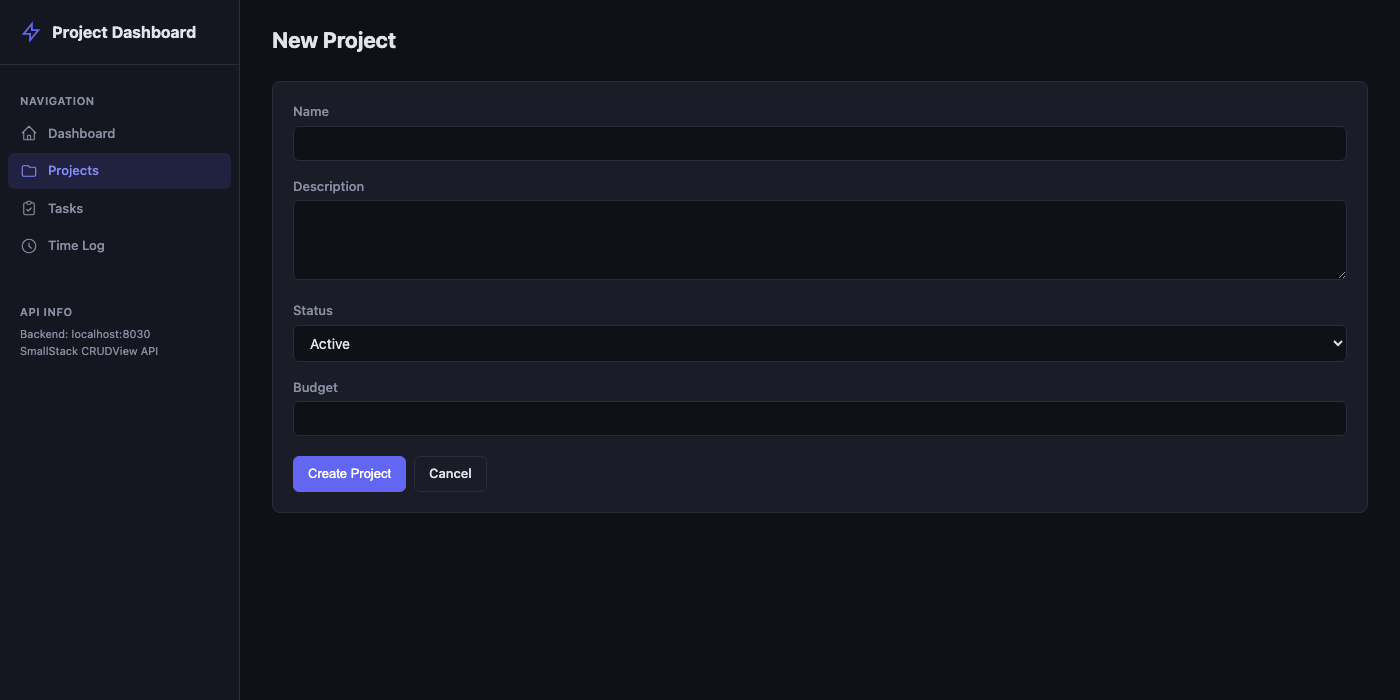
Create src/routes/projects/new/+page.svelte:
<script lang="ts">
    import { goto } from '$app/navigation';
    import { api } from '$lib/api';
    import ErrorDisplay from '$lib/components/ErrorDisplay.svelte';

    let form = $state({ name: '', description: '', status: 'active', owner: 1, budget: '' });
    let error = $state<any>(null);
    let fieldErrors = $state<Record<string, string[]>>({});
    let saving = $state(false);

    async function handleSubmit(e: Event) {
        e.preventDefault();
        saving = true;
        error = null;
        fieldErrors = {};
        try {
            await api.createProject({ ...form, budget: form.budget || '0' });
            goto('/projects');
        } catch (e: any) {
            if (e.data?.errors) fieldErrors = e.data.errors;
            error = e;
            saving = false;
        }
    }
</script>

<div class="page-header"><h1>New Project</h1></div>
<ErrorDisplay {error} />

<div class="card">
    <div class="card-body">
        <form onsubmit={handleSubmit}>
            <div class="form-group">
                <label for="name">Name</label>
                <input id="name" type="text" bind:value={form.name} />
                {#if fieldErrors.name}<span class="field-error">{fieldErrors.name.join(', ')}</span>{/if}
            </div>
            <div class="form-group">
                <label for="description">Description</label>
                <textarea id="description" bind:value={form.description}></textarea>
            </div>
            <div class="form-group">
                <label for="status">Status</label>
                <select id="status" bind:value={form.status}>
                    <option value="active">Active</option>
                    <option value="paused">Paused</option>
                    <option value="completed">Completed</option>
                    <option value="archived">Archived</option>
                </select>
            </div>
            <div class="form-group">
                <label for="budget">Budget</label>
                <input id="budget" type="number" step="0.01" bind:value={form.budget} />
                {#if fieldErrors.budget}<span class="field-error">{fieldErrors.budget.join(', ')}</span>{/if}
            </div>
            <div class="form-actions">
                <button type="submit" class="btn btn-primary" disabled={saving}>
                    {saving ? 'Creating...' : 'Create Project'}
                </button>
                <a href="/projects" class="btn">Cancel</a>
            </div>
        </form>
    </div>
</div>
Svelte advantage: bind:value is two-way binding — no onChange handlers needed. The form object updates automatically as the user types.
Project Form (Edit)
Create src/routes/projects/[id]/edit/+page.svelte:
<script lang="ts">
    import { onMount } from 'svelte';
    import { goto } from '$app/navigation';
    import { page } from '$app/state';
    import { api } from '$lib/api';
    import ErrorDisplay from '$lib/components/ErrorDisplay.svelte';

    const id = parseInt(page.params.id, 10);

    let form = $state({ name: '', description: '', status: 'active', owner: 1, budget: '' });
    let error = $state<any>(null);
    let fieldErrors = $state<Record<string, string[]>>({});
    let saving = $state(false);

    onMount(async () => {
        try {
            const data = await api.getProject(id);
            form = {
                name: data.name,
                description: data.description || '',
                status: data.status,
                owner: data.owner,
                budget: data.budget,
            };
        } catch (e) {
            error = e;
        }
    });

    async function handleSubmit(e: Event) {
        e.preventDefault();
        saving = true;
        error = null;
        fieldErrors = {};
        try {
            await api.updateProject(id, form);
            goto('/projects');
        } catch (e: any) {
            if (e.data?.errors) fieldErrors = e.data.errors;
            error = e;
            saving = false;
        }
    }
</script>
The edit form is nearly identical to create — just pre-populates from the API on mount and calls updateProject (PATCH) instead of createProject (POST).
Step 11: Add the Layout
Replace src/routes/+layout.svelte with a sidebar navigation:
<script lang="ts">
    import '../app.css';
    import { page } from '$app/state';

    let { children } = $props();

    const navItems = [
        { href: '/', label: 'Dashboard', icon: 'M3 12l2-2m0 0l7-7 7 7M5 10v10a1 1 0 001 1h3m10-11l2 2m-2-2v10a1 1 0 01-1 1h-3m-6 0a1 1 0 001-1v-4a1 1 0 011-1h2a1 1 0 011 1v4a1 1 0 001 1m-6 0h6' },
        { href: '/projects', label: 'Projects', icon: 'M3 7v10a2 2 0 002 2h14a2 2 0 002-2V9a2 2 0 00-2-2h-6l-2-2H5a2 2 0 00-2 2z' },
        { href: '/tasks', label: 'Tasks', icon: 'M9 5H7a2 2 0 00-2 2v12a2 2 0 002 2h10a2 2 0 002-2V7a2 2 0 00-2-2h-2M9 5a2 2 0 002 2h2a2 2 0 002-2M9 5a2 2 0 012-2h2a2 2 0 012 2m-6 9l2 2 4-4' },
        { href: '/time', label: 'Time Log', icon: 'M12 8v4l3 3m6-3a9 9 0 11-18 0 9 9 0 0118 0z' },
    ];
</script>

<div class="app-layout">
    <aside class="sidebar">
        <div class="sidebar-brand">Project Dashboard</div>
        <nav>
            {#each navItems as item}
                <a href={item.href}
                   class:active={page.url.pathname === item.href ||
                                 (item.href !== '/' && page.url.pathname.startsWith(item.href))}>
                    <svg viewBox="0 0 24 24" width="18" height="18" fill="none"
                         stroke="currentColor" stroke-width="1.5" stroke-linecap="round" stroke-linejoin="round">
                        <path d={item.icon} />
                    </svg>
                    {item.label}
                </a>
            {/each}
        </nav>
    </aside>
    <main class="main-content">
        {@render children()}
    </main>
</div>
Svelte 5 note: {@render children()} replaces the old <slot /> syntax. $props() destructuring is the new way to receive component props.
Step 12: Run It
Terminal 1 — Backend:
cd ss-svelte/backend
make run PORT=8030
Terminal 2 — Frontend:
cd ss-svelte/frontend
npm run dev
Open http://localhost:8031 and you should see the dashboard with live data.
API Reference
SmallStack's CRUDView API gives you these endpoints per model:
| Method | URL | Response |
|---|---|---|
| GET | /api/{url_base}/ |
{"count", "page", "total_pages", "next", "previous", "results": [...]} |
| POST | /api/{url_base}/ |
201 with created object |
| GET | /api/{url_base}/<id>/ |
Single object |
| PATCH | /api/{url_base}/<id>/ |
Updated object (partial update) |
| DELETE | /api/{url_base}/<id>/ |
204 No Content |
Query Parameters
| Param | Example | Requires |
|---|---|---|
?q=term |
?q=authentication |
search_fields on CRUDView |
?field=value |
?status=active&priority=high |
filter_fields on CRUDView |
?page=N |
?page=2 |
Automatic (uses paginate_by) |
?expand=field1,field2 |
?expand=project,assignee |
api_expand_fields (always-on) or per-request |
?count_by=field |
?count_by=status |
Field must be in filter_fields |
?sum=field |
?sum=hours |
Field must be in api_aggregate_fields |
?avg=field |
?avg=hours |
Field must be in api_aggregate_fields |
?field__gte=date |
?created_at__gte=2026-03-01 |
Date fields in filter_fields (automatic) |
Filter Value Formats
| Field Type | Value | Example |
|---|---|---|
| ForeignKey | Primary key (integer) | ?project=1 |
| BooleanField | true or false |
?in_stock=true |
| CharField with choices | Choice value (not display name) | ?status=active (not Active) |
Error Responses
// 400 — Validation error (per-field)
{"errors": {"name": ["This field is required."]}}

// 401 — Bad token
{"error": "Invalid token"}

// 403 — Insufficient permissions
{"error": "Staff access required"}
Tips and Gotchas
FK expansion eliminates client-side joins
With api_expand_fields on your CRUDView, ForeignKey fields return objects instead of raw PKs:
<!-- With api_expand_fields = ["project"]: -->
<td>{typeof task.project === 'object' ? task.project.name : `#${task.project}`}</td>
You can also request expansion per-request with ?expand=project,assignee. Both server defaults and request params are merged.
Gotcha: Expanded FKs apply to all endpoints (list, detail, create response). When loading a record for editing, extract the ID:
project: String(typeof task.project === 'object' ? task.project.id : task.project)
Server-side aggregation replaces all-page fetching
Use ?count_by=, ?sum=, ?avg= instead of fetching every page to compute stats:
// Before: sequential page fetching (slow, O(N) API calls)
const allTasks: Task[] = [];
let pg = 1;
while (pg <= totalPages) {
    const res = await api.listTasks({ page: pg++ });
    allTasks.push(...res.results);
}
const doneCount = allTasks.filter(t => t.status === 'done').length;

// After: one API call, server computes the count
const res = await api.listTasks({ count_by: 'status' });
const doneCount = res.counts?.['done'] || 0;
// Also available: ?sum=hours, ?avg=hours, ?min=hours, ?max=hours
Fields for count_by must be in filter_fields. Fields for sum/avg/min/max must be in api_aggregate_fields. Filters apply before aggregation, so ?status=done&sum=hours sums only completed tasks.
Smart date filtering
Date fields in filter_fields automatically support range lookups — no extra configuration:
?created_at__gte=2026-03-01                    → on or after March 1
?created_at__lte=2026-03-31                    → on or before March 31
?due_date__gte=2026-03-01&due_date__lte=2026-03-31  → March tasks only
PATCH for partial updates
Use PATCH (not PUT) — only sends changed fields:
await api.updateProject(id, { status: 'completed' }); // Only updates status
Svelte 5 runes vs Svelte 4
This tutorial uses Svelte 5 runes ($state, $derived, $props). If you're on Svelte 4, replace:
- $state(value) → let x = value (reactive by default in Svelte 4)
- $derived(expr) → $: x = expr
- $props() → export let prop
File Structure
ss-svelte/
├── backend/                              # SmallStack clone
│   ├── apps/dashboard/
│   │   ├── models.py                     # Project, Task, TimeEntry
│   │   ├── views.py                      # CRUDViews with enable_api=True
│   │   ├── urls.py                       # URL wiring
│   │   └── management/commands/
│   │       └── seed_dashboard.py         # Sample data seeder
│   ├── config/settings/base.py           # INSTALLED_APPS
│   ├── config/urls.py                    # Include dashboard URLs
│   └── .env                              # CORS_ALLOWED_ORIGINS
│
├── frontend/                             # SvelteKit + Vite
│   ├── .env                              # VITE_API_BASE_URL + VITE_API_TOKEN
│   ├── vite.config.ts                    # Port 8031
│   └── src/
│       ├── lib/
│       │   ├── api.ts                    # Typed API client
│       │   └── components/
│       │       ├── ErrorDisplay.svelte   # API error rendering
│       │       └── Pagination.svelte     # Page navigation
│       ├── routes/
│       │   ├── +layout.svelte            # Sidebar + navigation
│       │   ├── +page.svelte              # Dashboard (stats, charts, table)
│       │   ├── projects/
│       │   │   ├── +page.svelte          # List + search + filter
│       │   │   ├── new/+page.svelte      # Create form
│       │   │   └── [id]/edit/+page.svelte # Edit form
│       │   ├── tasks/
│       │   │   ├── +page.svelte          # List + multi-filter + FK resolution
│       │   │   ├── new/+page.svelte      # Create with FK dropdown
│       │   │   └── [id]/edit/+page.svelte # Edit
│       │   └── time/
│       │       ├── +page.svelte          # List + FK resolution
│       │       ├── new/+page.svelte      # Log time
│       │       └── [id]/edit/+page.svelte # Edit
│       ├── app.css                       # Dark theme styles
│       └── app.html                      # HTML shell
│
├── screenshots/                          # Visual verification
├── doc-issues.md                         # Documentation issues found
└── tutorial.md                           # This file